Location Compare and tide alerts
Two cities side by side in one window, and a tide chart that finally tells you when the water is coming.
Some updates are a long list of small things. This one is two features people had been asking for, and then a long list of small things.
NEW — Location CompareMac
Two cities, one window. Pin any two of your saved places side by side and flip between current, hourly and daily without losing either of them. Tap a city header to swap that side for anywhere else on your list.
It sounds like a small thing until you are the person who checks home and the place they are flying to every single morning.
NEW — Tide AlertsMac
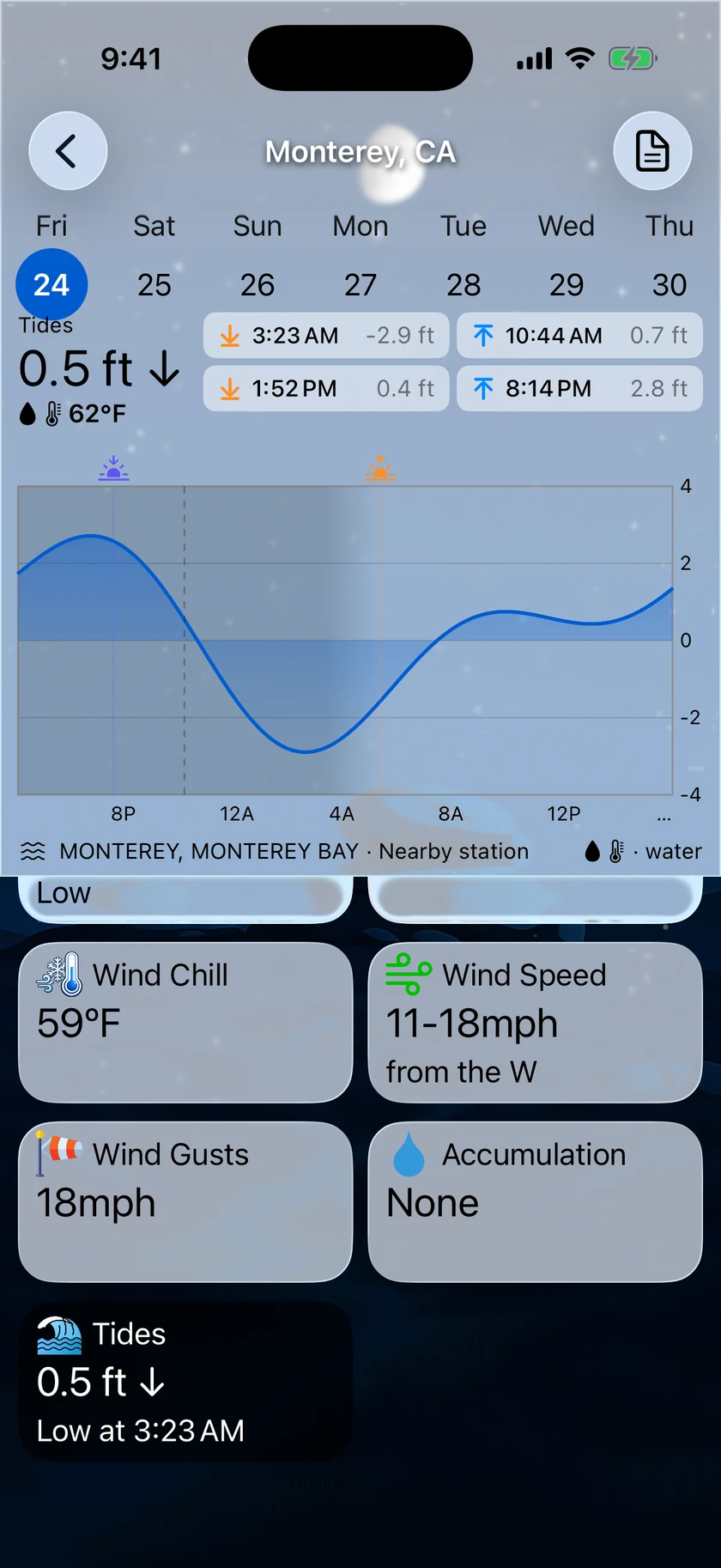
The tide chart now stretches across future days with a redesigned details layout — and more usefully, it can tap you on the shoulder. Set a threshold and Forecast Bar tells you when a high or low tide is approaching it.
Predictions come from NOAA and are computed on your device, so the chart is there whether or not you have a signal.
Plus 4 smaller changes — fixes, tidy-ups and one-line wins that didn't need a paragraph. See every line →
Everything in this release
NEW — Location CompareMac
Pin any two saved cities side-by-side and flip between current, hourly, and daily views in one window. Tap a city header to swap that side for anywhere on your list.
NEW — Tide AlertsMac
Get notified the moment a high or low tide approaches your threshold. The tide chart now stretches across future days with a redesigned details layout to match.
Fixes and polishMac
- Menu bar icon tint renders correctly
- Compare city picker shows state alongside city for clearer selection
- Data point popover wraps without truncation
- Custom notifications stay off when you turn them off
