New widgets, and an Apple TV rebuild
Half & Half and Hourly Curve join the widget lineup, the Smart widget fits everything on one page, and the Apple TV app gets rebuilt around live radar and the Top Shelf.
A release with two centres of gravity: the iPhone Home Screen, and the television in the other room.
Two new widgets. Half & Half and Hourly Curve join the Home Screen lineup, and the Smart widget stopped making you page through your own data — every data point now fits on one page, with icons, and the bottom row can carry a temperature curve. Air quality, tides and pollen became Smart widget data points at the same time.
Home and Lock Screen widgets also reach further ahead than they used to, and load faster getting there.
Apple TV, rebuiltTV
The Apple TV app got the bigger share of this release.
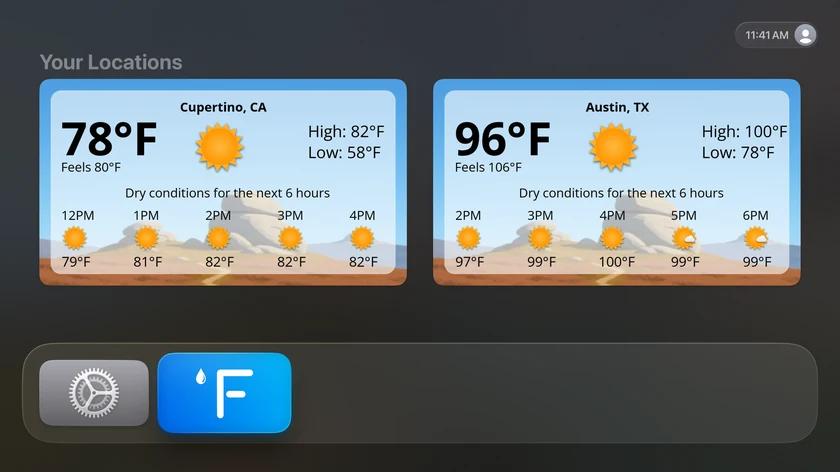
Top Shelf — the weather that sits above your Home Screen when Forecast Bar is in the top row — got its own tab and a one-click setup, with onboarding that actually explains what it is. Radar moved onto the main screen: press play without leaving Weather, and pan around the map with the remote.
Style settings now preview themselves, so you can see Summary against Compact and Timeline against Chart before choosing. Backgrounds, scenes and icon sets moved to picture pickers. Today's forecast starts expanded. Severe weather alerts got more compact and gained a zoomable map. And locations you add on your iPhone, iPad or Mac now simply appear on the TV.
Prefer the short version? See every line →
Everything in this release
- Half & Half and Hourly Curve join the home-screen widget lineupiOS
- Smart widget shows every data point on one page with iconsiOS
- Smart widget's bottom row can display a temperature curveiOS
- Air quality, tides, and pollen join the Smart widget's data pointsiOS
- Home and lock-screen widgets show more upcoming hoursiOS
- Widgets load faster and more reliablyiOS
- Moon phase forecasts include every cycle without skipped datesiOSMac
- Radar timeline progress glides smoothly between framesiOSMac
- Precipitation timing displays correctly with the 24-hour clockiOS
- Optional quit confirmation guards against accidental exitsMac
- Menu bar temperature stays up to date automatically, without a clickMac
- The in-app radar loop plays automatically when openedMac
- Your location appears as a dot on the in-app radarMac
- Hourly comparison marks where each new day beginsMac
- Top Shelf gets its own tab: set up Home Screen weather in one clickTV
- Live radar right on the main screen — press play without leaving WeatherTV
- Radar pan mode: move around the map with the remoteTV
- Set Minutely, 15 Minute, or Radar as your default precipitation viewTV
- Style settings now preview themselves — see Summary vs Compact and Timeline vs Chart before you pickTV
- Choose visual backgrounds, scenes, and icon sets from picture pickersTV
- Today's forecast starts expanded so the hourly timeline is one glance awayTV
- Severe-weather alerts are more compact, with a zoomable alert mapTV
- Locations added on iPhone, iPad, or Mac now appear on Apple TV automaticallyTV
- Redesigned Account & Sync and Subscription screensTV
- New onboarding introduces the Top Shelf with a one-tap setupTV
- Fixed a crash while scrolling the expanded hourly timeline during background refreshesTV
- Fixed the Top Shelf occasionally going blankTV
