Two Forecast Sources
Pick Apple Weather or The Weather Company, compare them side by side to see where the forecast is settled and where it isn't, and hide the kinds of alerts you never want to see.
Two Forecast SourcesiOS
Two forecasts are worth more than one when they agree. Gold subscribers can now run Forecast Bar on Apple Weather instead of The Weather Company, from Settings → Data & Layout. Pollen, air quality, history and 15-minute precipitation keep coming from The Weather Company either way, so switching costs you nothing.
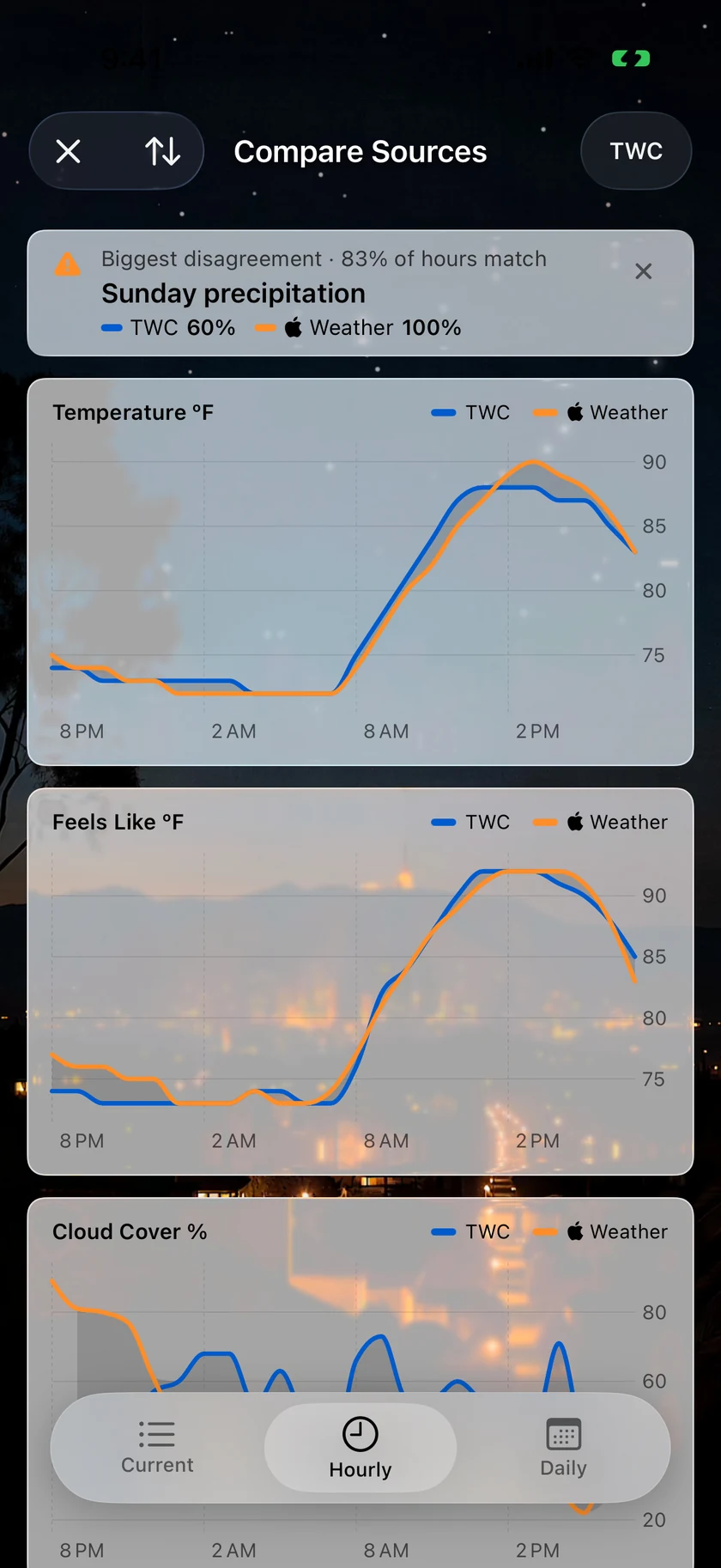
The point isn't picking a winner. The new Compare screen puts the two forecasts next to each other — every measurement charted at once, two lines with the disagreement shaded between them, high and low bars paired by day — and names the single biggest disagreement. Where the lines sit on top of each other, the next few hours are settled. Where they part is where to hedge. Drag across a chart and both readings follow your finger.
You don't have to leave the forecast to check. A new bar at the foot of the screen carries your source, Time Machine and the comparison together, and the eye above any hourly chart overlays the second forecast in place. It works for comparing two cities, too.
Hide the alerts you never wantiOSMacTV
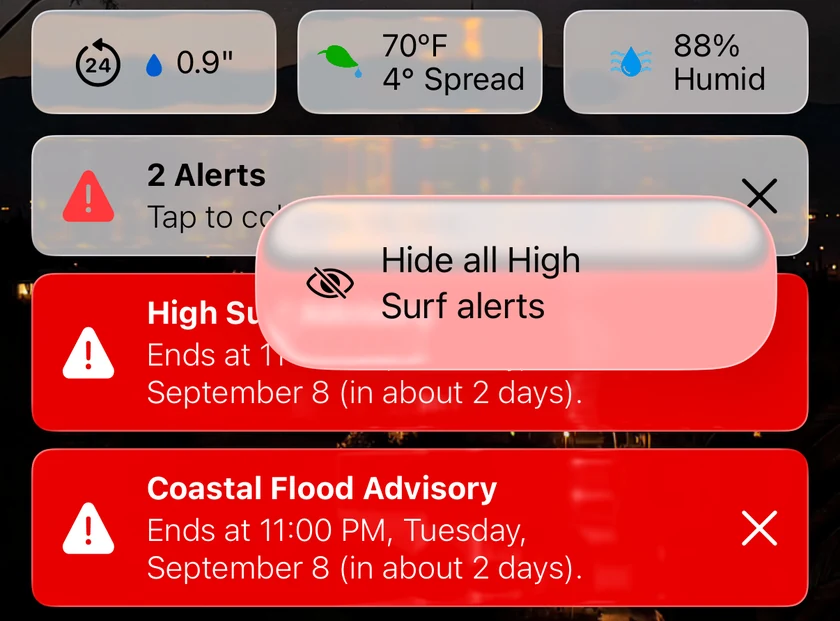
Some alerts are never for you. A Beach Hazard statement when you live inland lands in your list anyway, every time. Now you can hide a whole kind at once, straight from the card: touch and hold the X on iPhone, right-click on the Mac, open the alert on Apple TV, and choose Hide all. Dismiss the same kind twice and the card offers it on its own. If you also get notifications for that kind of alert, the app asks whether to stop those too, and the Hidden Alert Types list in Settings brings any type back.
Choose your forecast sourceMacTV
Run the app on Apple Weather or The Weather Company — your call, from Settings. On the Mac, the compare window charts every measurement with the disagreement shaded between the two lines, and an optional agreement band on the hourly graph shows where the forecast is least settled; menu-bar quick updates keep riding The Weather Company's observations in either mode. On Apple TV the switch lives in Settings → Units & Display, and the Top Shelf stays on The Weather Company.
Plus 40 smaller changes — fixes, tidy-ups and one-line wins that didn't need a paragraph. See every line →
Everything in this release
Two Forecast SourcesiOS
- Choose your forecast source. Gold subscribers can pick Apple Weather instead of The Weather Company in Settings → Data & Layout. Pollen, air quality, history and 15-minute precipitation keep coming from The Weather Company either way.iOS
- Compare both sources side by side. The new Compare screen charts every measurement at once — two lines with the disagreement shaded between them, and paired high/low bars by day — and names the single biggest disagreement. Drag across a chart and both readings follow your finger. Works for comparing cities too.iOS
- Switch sources without leaving the forecast: a new bar at the foot of the screen carries your source, Time Machine and the comparison together, and the eye above any hourly chart overlays the second forecast.iOS
Daily reports become Smart Weather StoriesiOSMac
- Gold members can have morning and evening report notifications written as a Smart Weather Story — the day's real story up front, tuned to your location and season, with an optional note telling it what to prioritize. Find it in Notifications → Daily Reports.iOS
- Gold members can have morning and evening report notifications written as a Smart Weather Story — the day's real story up front, tuned to your location and season, with an optional note telling it what to prioritize. Turn it on in Notifications → Daily Reports.Mac
Storm Tracker, up frontiOSMacTV
- Track on Lock Screen from the storm itself. When a storm cell is bearing down on you, the Storm Tracker card and the storm cell notification both carry a one-tap button that turns on the Storm Intercept Live Activity. Gold, iOS 17.2 or later.iOS
- The Storm Tracker now sits directly above the precipitation chart, ahead of the alerts in force, the storm report and the day's outlook, so a storm minutes out is the first thing you see.iOS
- The Storm Tracker now sits directly above the precipitation chart, ahead of the alerts in force, the storm report and the day's outlook, so a storm minutes out is the first thing you see in the panel.Mac
- The Storm Tracker now sits directly above the precipitation chart, ahead of the alerts in force, the storm report and the day's outlook, so a storm on its way is the first thing you see. The outlook card steps aside while a cell is being tracked and returns once it passes.TV
Hide the alerts you never wantiOSMacTV
- Touch and hold the X on an alert and choose Hide all — for example every Beach Hazard alert when you live inland. Dismiss the same kind twice and the card offers it. If you also get notifications for that kind of alert, the app asks whether to stop those too. Bring a type back in Settings → Forecasts → Hidden Alert Types.iOS
- Right-click an alert and choose Hide all — for example every Beach Hazard alert when you live inland. Dismiss the same kind twice and the card offers it. If you also get notifications for that kind of alert, the app asks whether to stop those too. Bring a type back in Settings → Forecasts → Hidden Alert Types.Mac
- Open an alert and choose Hide all to stop seeing every alert of that kind — for example all Beach Hazard alerts when you live inland. Hidden types never appear again on any of your locations.TV
- Bring a type back in Settings → Data & Layout → Hidden Alert Types.TV
WidgetsiOSMac
- Widgets flag severe weather. When a warning is in force for a widget's location, the medium and large widgets show a severity-colored badge; tap it to see the active warnings.iOS
- Widgets build their timelines about three times faster, rain bars line up with their hour columns again, and the iPad lock screen Data Point gauge renders again.iOS
- Widgets flag severe weather. When a warning is in force for a widget's location, the medium and large widgets show a severity-colored badge; click it to see the active warnings. Widgets also build their timelines about three times faster, and rain bars line up with their hour columns again.Mac
StargazingiOSMacTV
- Upcoming Sky Events — the full catalog of eclipses, meteor showers and conjunctions — is always one tap away at the bottom of the stargazing forecast, and Compare Locations now fills in Stargazing Conditions for both cities.iOS
- Upcoming Sky Events — the full catalog of eclipses, meteor showers and conjunctions — is always one click away at the bottom of the stargazing forecast, and Compare Locations now fills in Stargazing Conditions for both cities.Mac
- Upcoming Sky Events is now always one click away, at the bottom of the stargazing forecast — the full catalog of eclipses, meteor showers and conjunctions, opening full screen.TV
- Stargazing conditions read "Fair" everywhere, so the hourly grid no longer disagrees with the notification and the event card about the same night.TV
Sync what you wantiOSMacTV
- Sync Layout Across Devices, in Settings → Data & Layout, lets this iPhone or iPad keep its own data points and layout while your other devices carry on sharing theirs.iOS
- Sync Layout Across Devices, in Settings → Data & Layout, lets this Mac keep its own data points and layout while your other devices carry on sharing theirs.Mac
- Sync Layout Across Devices, in Settings → Data & Layout, lets this Apple TV keep its own main-screen data points and precipitation view while your other devices carry on sharing theirs — and data points chosen on the TV now stick instead of reverting on the next settings sync.TV
Tell us what you wantiOSMac
- Request a Feature lives in Settings → Help & Info: pick a type, describe it, attach a screenshot, and it lands with us directly.iOS
- Request a Feature lives in About & More → Support: pick a type, describe it, attach a screenshot, and it lands with us directly.Mac
Faster everywhereiOSTV
- Weather loads sooner after launch, alerts arrive sooner after each refresh, tides compute about twice as fast, and the radar opens faster. Apple Watch complications and radar tiles render faster too.iOS
- Weather loads sooner after launch: the forecast request leaves the moment the app opens, and tide data is ready before it returns.TV
- Alerts arrive sooner after each refresh, tide predictions compute about twice as fast, and the charts do less work per redraw.TV
Sharper fundamentalsiOSMacTV
- Sunrise, sunset and twilight use the NOAA solar algorithm, accurate to the minute at any latitude, and the UV Index chart is back to National Weather Service colors.iOS
- AI stories stay put between refreshes instead of rewriting themselves when conditions drift a degree.iOSMac
- Tides rank by how close the next turn is, rising through the three hours before each high or low.iOS
- Fixed Cloud Cover reading 100% under any overcast on Apple Weather, "0 Alerts" above visible alert cards on iPad, a Compare card row showing a tornado icon when a lookup failed, a subscription that read as expiring the moment you looked, a rare crash on launch, and Apple Watch gusts converted twice.iOS
- The app no longer wakes itself in the background on devices without a subscription.iOS
- Weather loads sooner after launch, alerts arrive sooner after each refresh, tides compute about twice as fast, and the radar window opens faster.Mac
- Sunrise, sunset and solar times use NOAA-grade astronomy math, the UV Index chart matches the NWS scale again, and reissued alerts no longer stack up.Mac
- The Subscription window sizes itself to its content, names the row Mac Subscription, and shows an expiration date only when there is one instead of reading as if it ran out a minute ago.Mac
- Fixed the Compare Locations window refusing to reopen for the same city, the compare card's switch-to-city arrow leaving the previous city's numbers on screen, a compare row showing a tornado icon when a lookup failed, Cloud Cover reading 100% under any overcast on Apple Weather, "0 Alerts" above visible alert cards, and a crash when the radar map closed with the panel.Mac
- Sunrise and sunset times now come from NOAA-grade astronomy math — more accurate at high latitudes and around DST changes — and chart axes now scale to the data.TV
- Daily and week-ahead AI stories stay put between refreshes instead of rewriting themselves every time conditions drift a degree, and Apple Weather daily rows show their forecast sentence straight away rather than a placeholder.TV
- Fixed Cloud Cover reading 100% under any overcast in Apple Weather mode, and low contrast on the Apple Weather attribution badge.TV
- Tides rank by how close the next turn is rather than sitting near the top all day: they rise through the three hours before each high or low, stand out further when that turn is unusually high or low for the station's week, and sit below the everyday basics in between.TV
- The Top Shelf stays up when the forecast feed sends a malformed row, and choosing Current Location before a fix arrives no longer records an empty location for your widgets and other devices.TV
Choose your forecast sourceMacTV
- Gold members can switch the app to Apple Weather — or stay on The Weather Company — from Settings → Data & Layout. Pollen, air quality, history and 15-minute precipitation keep coming from The Weather Company either way, and menu-bar quick updates ride its observations in both modes.Mac
- Compare sources side by side. The new compare window charts every measurement at once — two lines with the disagreement shaded between them, and paired high/low bars by day — and names the biggest disagreement. Drag across a chart and both readings follow the pointer. Works for comparing cities too, and an optional agreement band overlays the second source on the hourly graph.Mac
- Gold members can switch the TV app to Apple Weather — or stay on The Weather Company — from Settings → Units & Display. The Top Shelf and widgets on other devices continue to show The Weather Company.TV
Runs on VenturaMac
- Now runs on macOS 13.3 and later (previously 14.6), so Macs that can't go past Ventura can use the current app. Modern Macs are untouched.Mac
Find your menu bar itemMac
- If Forecast Bar's menu bar item disappears, Settings → General → Menu Bar now says why — hidden behind the camera housing, or parked by a menu bar manager such as Ice or Bartender — with a button to the fix.Mac
Alerts that stay currentTV
- Weather alerts stop repeating. When a forecast office reissues an advisory — a fresh air quality alert, or a storm statement re-tracked as it moves — you now see only the one that's current, not every version still technically live.TV
- An alert the office never gave an end time now says "Expires" instead of "Ends" — the hour shown is when the bulletin needs reissuing, not when the weather stops.TV
Compare, chartedTV
- City comparisons can flip from columns to a chart — two lines with the disagreement shaded between them, and paired high/low bars by day.TV
