
Build a watch face around your weather.
Every slot on this face is Forecast Bar: a wind compass in the corner, today's range and conditions inline, an hourly visual forecast across the middle, and pressure, UV, and air quality gauges along the bottom. Swap any of them for the data you actually check.
- Hourly and daily visual forecasts with condition icons
- Corner and circular gauges for wind, UV, pressure, and AQI
- Inline one-liners: high, low, and what's coming
- A tides polar gauge for coast and boat days
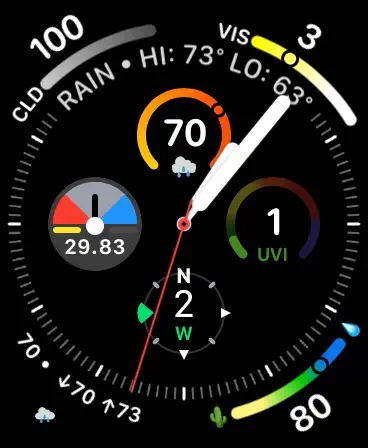
Corners, dials, and rings that fit analog faces.
Complications shouldn't only work on the grid faces. Forecast Bar's corner gauges and circular dials wrap naturally around analog faces — temperature with today's range, cloud cover, visibility, humidity, and more, each one glanceable at arm's length.
- Corner gauges show a value in context, not just a number
- Circular dials for temperature, UV, pressure, and rain
- Mix Forecast Bar with your other favorite complications
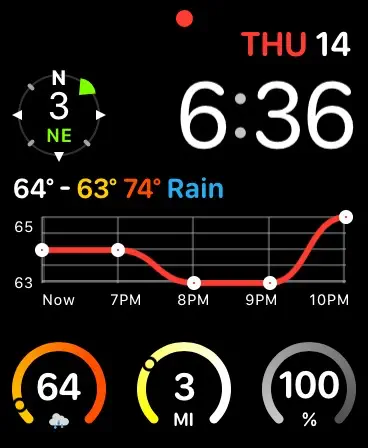
Real data graphs, on a watch face.
The rectangular family is big enough for an actual chart. Forecast Bar uses it: a temperature graph for the hours ahead, hourly condition strips, or a compact daily outlook — so a glance tells you the shape of the day, not just the current number.
- Temperature graph for the next several hours
- Hourly chart with times, icons, and temps
- Values advance hour by hour between refreshes
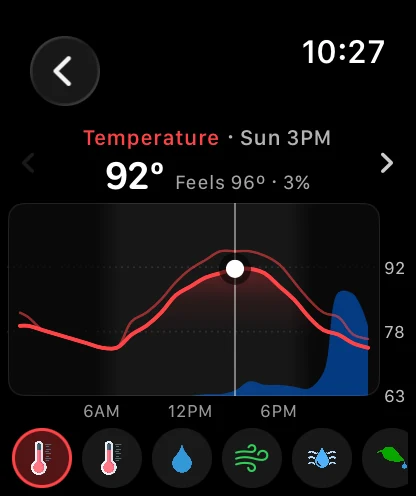
Charts you scrub with the Digital Crown.
Open the watch app and the forecast becomes a full-screen chart. Turn the Digital Crown and a dot rides the curve hour by hour, with a click at every hour and the reading following along. Keep turning and the chart rolls into tomorrow, and on through the week.
- Ten data points: temperature, feels like, rain chance, wind, UV, humidity, and more
- The chance of rain drawn behind the temperature curve, night shaded in
- Wind direction arrows along the wind curve, gusts as a second line
- The same charts as Forecast Bar on iPhone, sized for the wrist
And the charts are one screen of it: 11.7 redesigned the whole app around a sky that matches the real weather and time of day. See the Apple Watch app →
Every family, covered.
watchOS complications come in four families. Forecast Bar fills all of them, with 100+ configurations in total.
Circular
Compact dials and gauges: current temperature, precipitation, UV, pressure, air quality — and the tides polar gauge that shows where you are in the cycle.
Corner
A value plus a curved gauge tucked into the corner of analog faces — temperature with today's range, wind with direction, UV, and more.
Inline
One line above the time: high and low, current conditions, or what's about to change. The fastest possible glance.
Rectangular
The big slot, put to work: hourly visual forecasts, daily outlooks, and real data graphs like the temperature curve for the hours ahead.
Add a complication in under a minute.
Install Forecast Bar
Get Forecast Bar for iPhone and the watch app installs alongside it — or install it from the App Store directly on your watch.
Edit your watch face
Long-press your watch face, tap Edit, and swipe to the complications screen. (The Watch app on iPhone works too.)
Pick your complication
Tap a slot, scroll to Forecast Bar, and choose from the gallery — then repeat for as many slots as you want to fill.
An honest note about refresh timing.
watchOS budgets background updates for every app on your wrist — no complication from any developer can refresh every minute all day, and anyone implying otherwise is overselling.
Forecast Bar is built to do well within that budget: it schedules smart background refreshes, keeps a shared weather cache, and bakes hour-by-hour values into each timeline so complications advance on their own between refreshes. The watch also fetches its own data, so none of this depends on your iPhone being nearby.
Questions about watch complications
How do I add a Forecast Bar complication to my watch face?
Which complication types does Forecast Bar support?
How often do Apple Watch complications update?
Does Forecast Bar show tides on the watch face?
Is there weather radar on Apple Watch?
Does the watch app work without my iPhone nearby?
How much does Forecast Bar cost?

Put the forecast on your wrist.
Build your watch face and wear it for a week — on iPhone and iPad, every subscription starts with a 7-day free trial.
Free to download; live weather requires a subscription. On iPhone and iPad, every subscription includes a 7-day free trial for new subscribers; Mac plans do not. Mac and iOS plans are separate; Apple TV is included with Forecast Bar Gold on iOS.
More from Forecast Bar
iPhone weather widgets
12+ Home and Lock Screen widgets, StandBy, and Live Activities that track rain minute by minute.
Alerts that matter
Severe weather at the moment of issue, rain nowcasts, and custom alerts on 14 data points.
Forecast Bar vs. Apple Weather
A factual comparison — including when the built-in app is genuinely enough.
Mac menu bar weather
Up to five configurable menu bar items, with a 48-hour timeline and 15-day outlook one click away.
Weather radar for Mac
A standalone radar window with future radar, live lightning, satellite, and NWS warnings on the map.
Weather on Apple TV
Radar, forecasts, and Top Shelf weather on the biggest screen in the house.