A weather station, not just an app.
Most weather checks are a glance. On Apple TV, Forecast Bar makes the glance happen on the Home Screen — and makes the deep look spectacular.
Top Shelf forecasts
Put Forecast Bar in your top app row and the Home Screen itself shows live forecasts for up to three locations. Setup is one click from the dedicated Top Shelf tab.
Radar on the biggest screen
Full-screen animated radar with future frames and lightning strikes. Play it right from the main screen, or use pan mode to move around the map with the remote.
Storm Cells and Storm Tracker
Every tracked storm is drawn on the radar with its probability of turning severe, from NOAA/CIMSS ProbSevere guidance updated every two minutes. When one is closing on your location, a card leads with the verdict — on track for you, or expected to miss — and counts down to arrival.
Stargazing and Time Machine
Stargazing Conditions shows tonight's best window with darkness, Moon and an hourly quality chart, alongside a browser of upcoming showers and eclipses. Time Machine opens any supported date, past or future, with a date chooser built for a remote rather than a touchscreen.
Compare cities
Up to five saved cities sit alongside your forecast with their local time, conditions and temperature — the trip you are taking and the place you left, on one screen.
14-day forecast
Two weeks of forecast, with today's hourly timeline expanded and one glance away the moment the app opens.
Severe weather alerts
Official alerts for your locations, presented with a compact card and a zoomable alert map so you can see exactly what area is affected.
Your locations, already there
Locations added on iPhone, iPad, or Mac appear on Apple TV automatically. Nothing to re-enter with the remote.
Make it yours
Choose visual backgrounds, scenes, and icon sets from picture pickers, and preview Summary vs. Compact and Timeline vs. Chart styles before you pick.
What it looks like from the couch.
Captured on Apple TV 4K. Every panel is built for the remote — big type, a focus ring you can see from across the room, and nothing that needs a touchscreen.
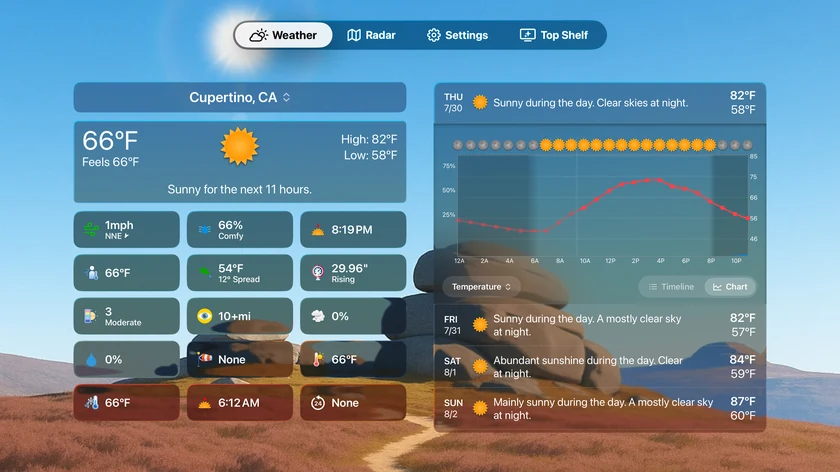
The whole forecast, one glance away.
Current conditions, a grid of data points, today's hourly chart and the days ahead share one screen. Move the focus with the remote to expand any of them.
- Hourly timeline or chart for any day
- Data point tiles you choose in Settings
- Radar, Settings and Top Shelf one click up
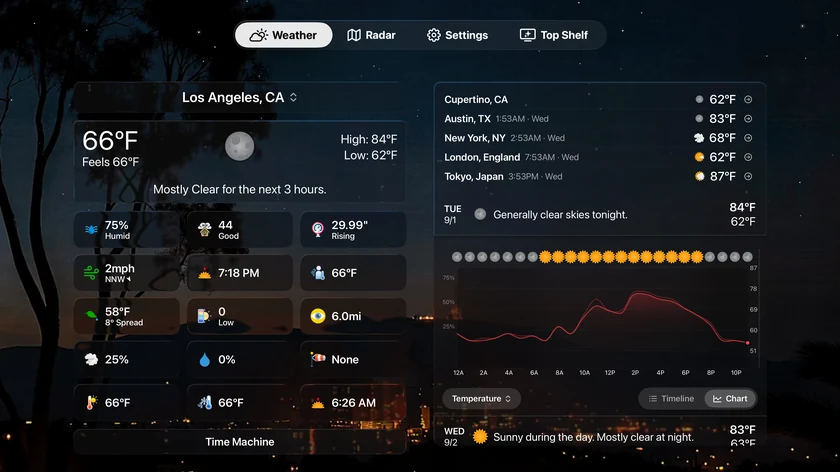
Five cities, their local time, on the same screen.
The Compare card keeps the places you care about beside your own forecast. Each row shows the city's local time, its current conditions and temperature, so the trip you are taking and the family you left are both one glance away.
- Up to five saved cities
- Local time for every city in a different zone
- Sits above or below the daily forecast, your choice
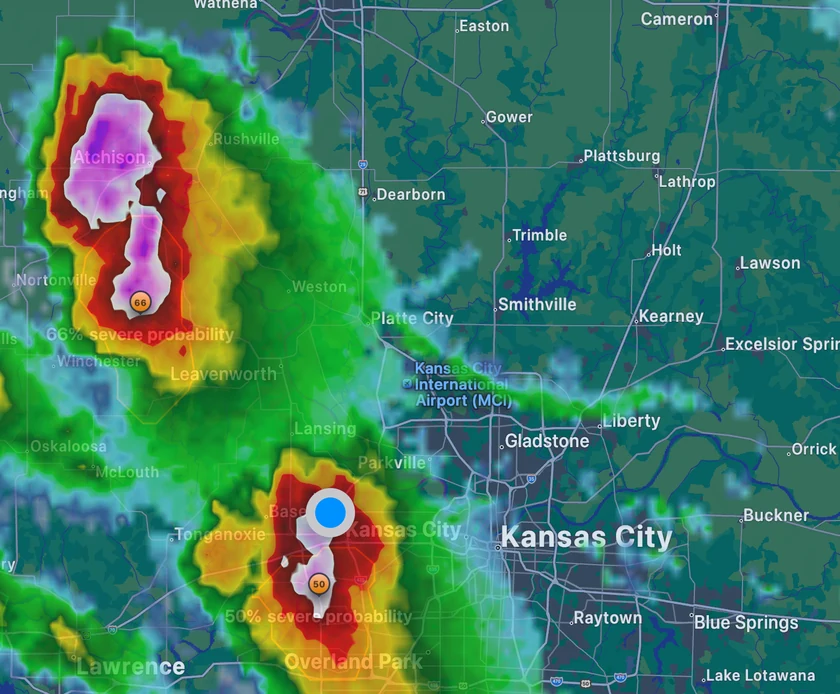
Every storm on the radar, with its odds of turning severe.
Storm Cells draws each tracked storm on the full-screen radar with its probability of producing large hail, damaging wind or a tornado within the hour, from NOAA/CIMSS ProbSevere guidance that updates every two minutes. The number sits right on the storm, so you can see which cell matters from across the room.
- Probability badge on every tracked cell
- Updates every two minutes with the radar loop
- Toggle the layer from the radar's remote controls
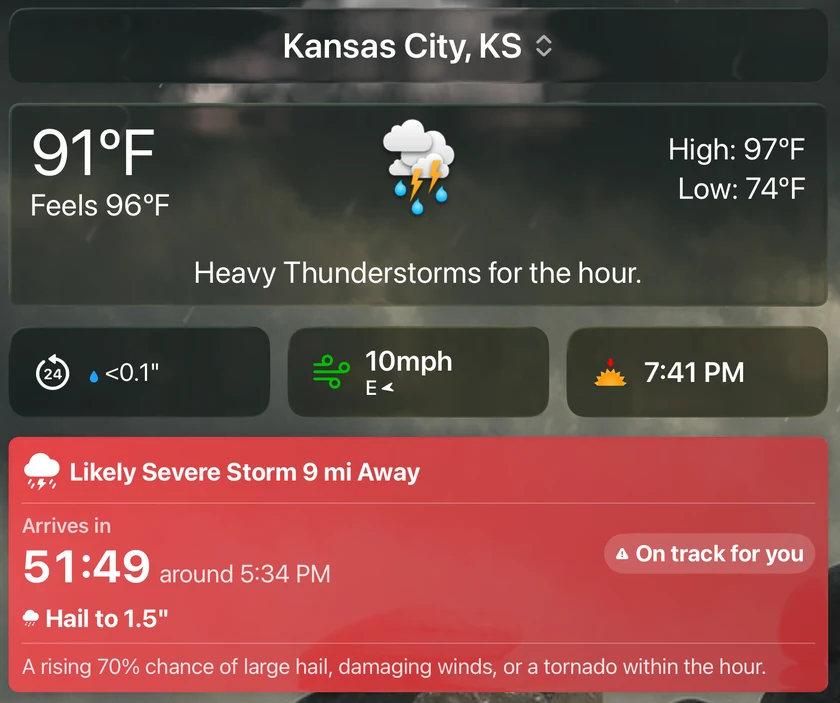
When one is coming your way, the card says so.
A storm closing on your location gets its own card above the hourly forecast. It leads with the verdict — on track for you, or expected to miss — then the severity, the hazards to expect and a live countdown to arrival, all in type sized for the couch.
- On track or expected to miss, decided by the storm's actual path
- Possible, Likely Severe or Dangerous, with hail size and wind odds
- Counts down to arrival and disappears once the storm has passed
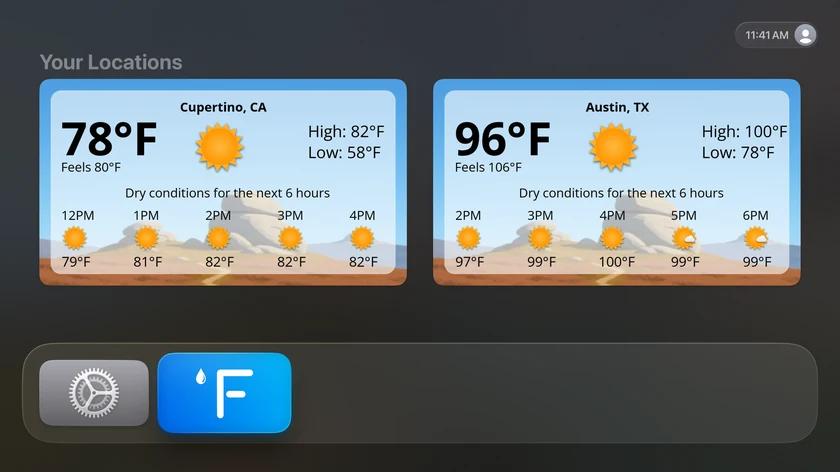
Forecasts before you even open the app.
Put Forecast Bar in the top row of your Home Screen and Top Shelf shows live cards for up to three locations, each with the next few hours, without opening anything.
- Up to three locations on the Home Screen
- Current temperature, feels-like, high and low
- Refreshes on its own through the day
Included with Forecast Bar Gold on iOS — no separate purchase.
If you subscribe to Forecast Bar Gold on your iPhone or iPad, the Apple TV app is already part of your plan. Open the App Store on your Apple TV, search for Forecast Bar, and sign in with the same Apple Account.
Not a subscriber yet? Forecast Bar is free to download, live weather requires a subscription, and on iPhone and iPad every subscription starts with a 7-day free trial for new subscribers.
Questions about Forecast Bar on Apple TV
How do I get Forecast Bar on Apple TV?
What is Top Shelf weather on Apple TV?
Does Forecast Bar show radar on Apple TV?
Do I have to add my locations again on Apple TV?
Can Apple TV track individual storms?
Does Apple's own Weather app run on Apple TV?

Put the forecast on your TV.
Get Forecast Bar on iPhone or iPad, then open the App Store on your Apple TV and search for Forecast Bar. Gold subscribers are already covered.
Free to download; live weather requires a subscription. On iPhone and iPad, every subscription includes a 7-day free trial for new subscribers; Mac plans do not. Mac and iOS plans are separate; Apple TV is included with Forecast Bar Gold on iOS.
More from Forecast Bar
iPhone weather widgets
12+ Home and Lock Screen widgets, StandBy, and Live Activities that track rain minute by minute.
Apple Watch complications
100+ complication configurations — hourly charts, tide gauges, AQI, pressure, and more.
Alerts that matter
Severe weather at the moment of issue, rain nowcasts, and custom alerts on 14 data points.
Mac menu bar weather
Up to five configurable menu bar items, with a 48-hour timeline and 15-day outlook one click away.
Weather radar for Mac
A standalone radar window with future radar, live lightning, satellite, and NWS warnings on the map.
Forecast Bar vs. Apple Weather
A factual comparison — including when the built-in app is genuinely enough.