UV in Forecast Bar, in short
- Hourly chart
- Forecast Bar charts the UV index hour by hour, and you can switch days in the forecast strip and scrub to any hour.
- Levels
- Forecast Bar labels the UV index Low, Moderate, High, Very High or Extreme.
- Custom alert
- A Forecast Bar custom notification can watch the UV index, with a threshold from 0 to 12, rising above or falling below, during the day, overnight or at any time.
- Sunscreen Reminder
- Forecast Bar's Sunscreen Reminder preset notifies you when the UV index will rise above 8 during the day, and you can edit it like any other alert.
- Smart tiles
- With Sort Data Points by Relevance on, Forecast Bar moves UV up as it climbs on a sunny day, and down in the last two hours before sunset and at night.
- Glanceable
- UV Index can appear in Forecast Bar's Home Screen and Lock Screen widgets, as an Apple Watch tile with a chart, and in the Mac menu bar.
- Plan
- The UV chart and tile are included with Silver and Gold on iPhone and iPad, and with Plus and Pro on the Mac. Custom UV alerts need Gold, or Pro on the Mac.
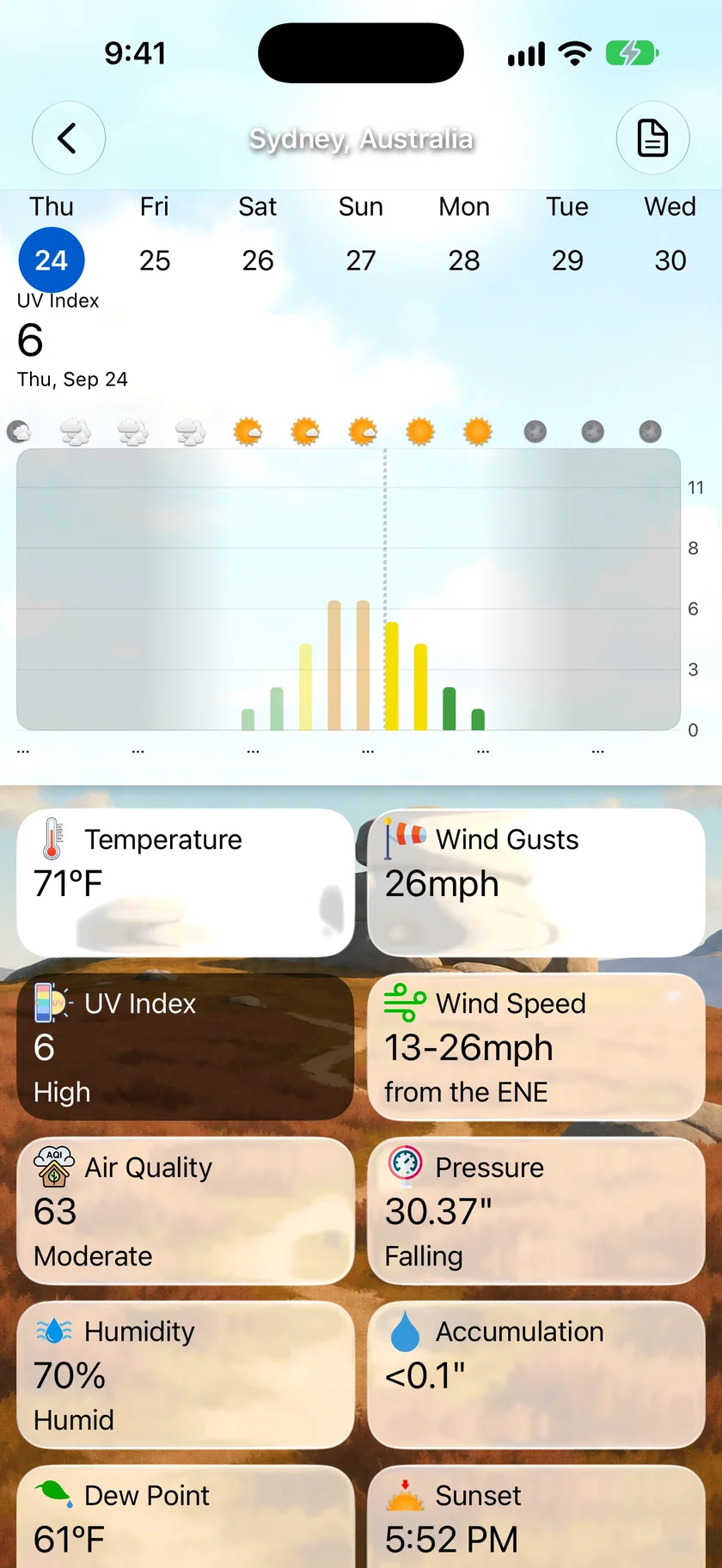
Find the two hours to stay in the shade.
Tap the UV Index tile and you get the day as bars, one for each hour, colored by level. Drag across them to read any hour, or pick another day in the strip above. With Sort Data Points by Relevance on, the UV tile moves up on a strong afternoon and drops away after dark.
- Hourly bars, colored by level
- Low, Moderate, High, Very High or Extreme on the tile
- Switch days to plan ahead
- Prefer your own order? Drag the tile where you want it
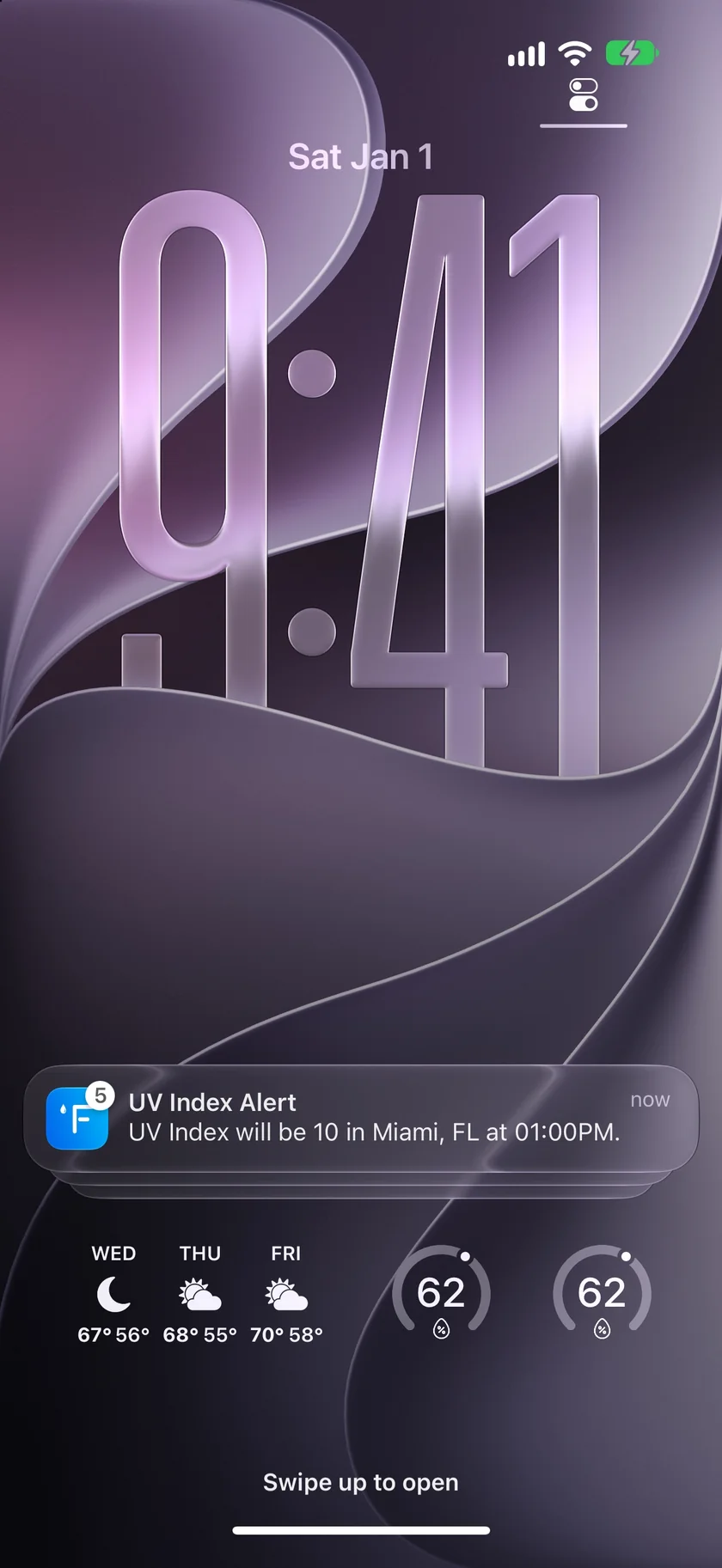
An alert at your UV, not someone else's.
Build a custom notification on UV Index, choose your threshold from 0 to 12, and pick the time of day it reaches you. It tells you the level, the place and the hour. Or switch on the Sunscreen Reminder preset, which watches for a UV above 8 during the day.
- Rises above or falls below your number
- During the day, overnight or at any time
- You choose when it's delivered
- Needs Gold on iPhone and iPad, or Pro on the Mac
An honest note: UV here is a number and a chart.
Forecast Bar shows the UV index and its level. It's a forecast, so it can shift as clouds change, and it isn't medical advice: it won't tell you how long to stay out or what sunscreen to use. Your doctor or local health service can.
There's no UV map. Forecast Bar 11.9 retires the UV map layer, and the UV forecast stays in Details, tiles, widgets and Apple Watch. Custom alerts need Sign in with Apple and notifications turned on.
Questions about the UV index
Does Forecast Bar show the UV index by the hour?
Can I get a UV index alert?
Can I put the UV index on a widget or Apple Watch?
What are smart tiles?
Does Forecast Bar have a UV map?
How much does Forecast Bar cost?

Know when the sun's at its strongest.
Try the hourly UV chart free for 7 days with a new iPhone or iPad subscription.
Free to download; live weather requires a subscription. On iPhone and iPad, every subscription includes a 7-day free trial for new subscribers; Mac plans do not. Mac and iOS plans are separate; Apple TV is included with Forecast Bar Gold on iOS.
More from Forecast Bar
Pollen count
Today's tree, grass and weed pollen, worst first, with the tree species behind it. US only.
iPhone weather widgets
17 Home and Lock Screen widgets, StandBy, and Live Activities that track rain minute by minute.
Weather app for Apple Watch
A full forecast on your wrist: a sky that matches the weather, a week you can read at a glance, charts you scrub with the Digital Crown, and a layout you arrange yourself.