Forecast Bar on Apple Watch, in short
- What it is
- A full weather app for Apple Watch: current conditions under a sky that matches the weather, a Week Ahead list, a tile for every reading, precipitation for the next hour or the next 6 hours, Sun & Moon and Wind screens, interactive charts, severe weather alerts and animated radar.
- The sky
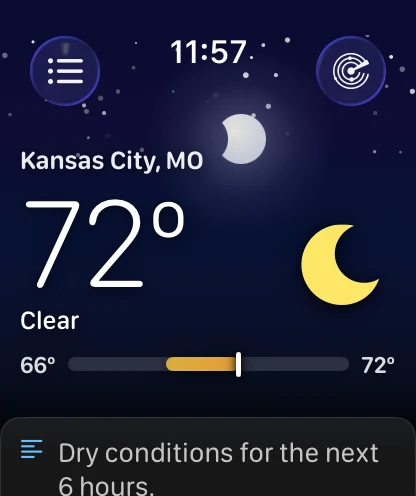
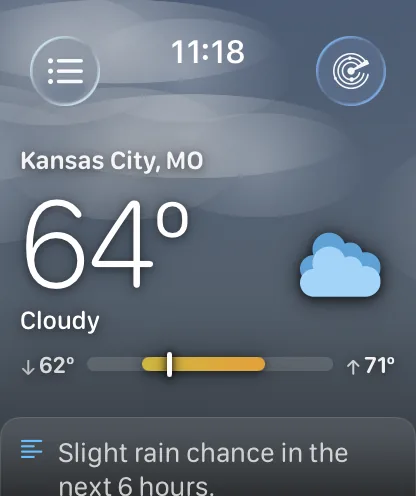
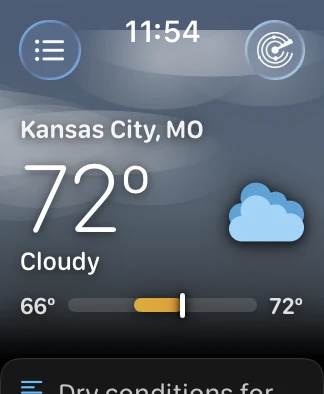
- The main screen's background is drawn from the sun's real elevation for your location and the current conditions — stars at night, a sun or moon glow, haze that drifts when it is cloudy. It fades to black behind the cards below it.
- Week Ahead
- A vertical list of the days, each with its own temperature bar. The bars are scaled to the whole week, so a warm day is visibly longer and further right than a cold one.
- Charts
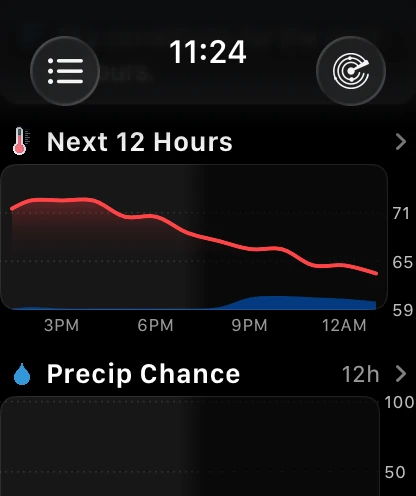
- The watch app charts twelve data points — temperature, feels like, chance of rain, wind, humidity, dew point, heat index, wind chill, UV index, cloud cover, pressure and visibility — for the next 24 hours and then day by day for about a week. Tap a data tile and the chart opens on that reading.
- The hours
- The hourly strip draws three ways: Plain, the aligned columns; Curve, which floats each hour's icon and temperature by how warm it is; and Chart, which draws the same hours as a single curve and opens the full charts when tapped. Plain is the default.
- Rain in the next hour
- Where Apple Weather has coverage and something is actually falling, the watch fetches Apple's minute-by-minute forecast itself, and the precipitation card has a 1 Hour / 6 Hours switch that remembers which one you last chose. Otherwise it shows the same six-hour, quarter-hour series it always has. Weather data by Apple Weather.
- Arrange it
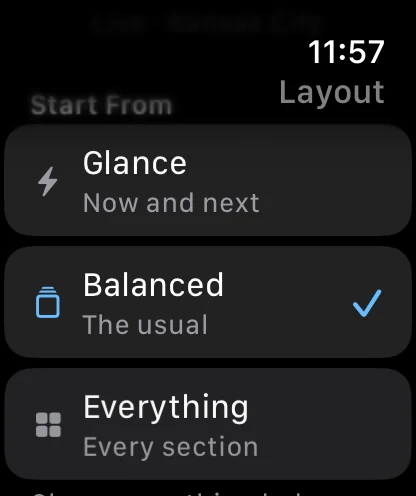
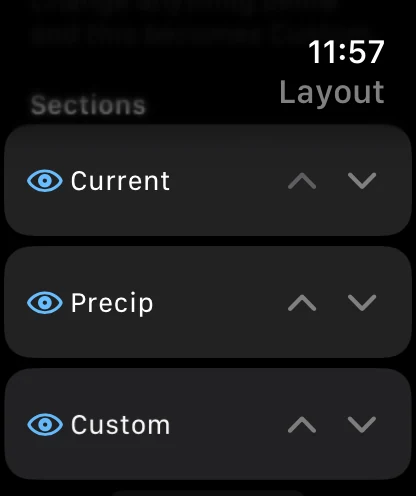
- Every section on the main screen can be shown, hidden or moved, on the watch or from your iPhone. Three presets — Glance, Balanced and Everything — are one tap, and three header styles trade the sky for a tighter screen.
- Subscription
- The watch app is included with Forecast Bar Silver or Gold on iPhone — it is not a separate purchase. Radar on the watch is a Gold feature.
- Requires
- Apple Watch running watchOS 10 or later. The redesigned app, the new screens and Watch Layout require Forecast Bar 11.7 or later.
A watch app that looks like the weather.
The main screen was rebuilt around one idea: before you have read a single number, the screen should already have told you something.
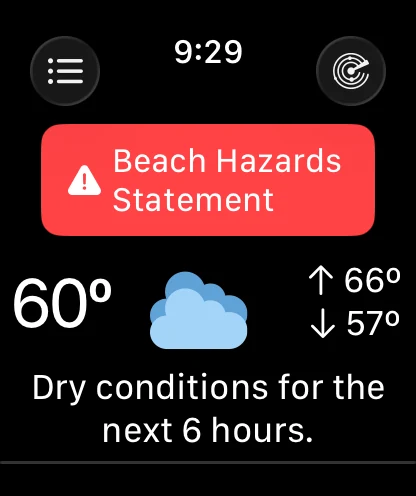
A sky that matches the real weather.
The background is not a picture. It is built from the sun's real elevation for where you are and what the sky is actually doing — deep blue at midday, rose and amber as the sun drops, and a field of stars once it is properly dark, with a glow where the sun or the moon really is. Cloud cover greys and flattens it; a storm darkens it. It runs edge to edge behind the clock, then fades to black so every card below it sits on a dark screen.
- Stars at night, and a sun or moon glow in the right place
- Haze that drifts when it is cloudy
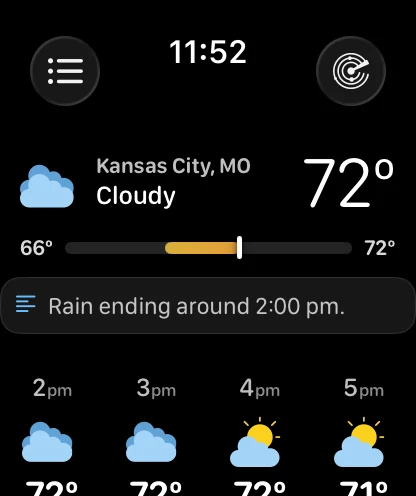
- A range bar marking where the temperature is now between today's low and high
- A colour-coded card above the conditions when an alert is active
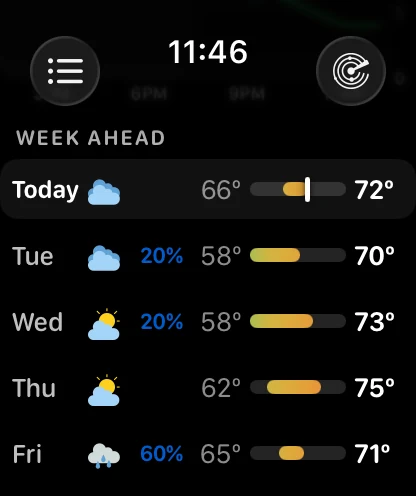
A week you can read in one look.
The days are a vertical list now, not a strip you push sideways. Each row carries the day, its icon, the chance of rain when there is one, and a temperature bar — and every bar is scaled to the same week, so you can see the cold snap coming without reading a single number. Today's row carries a marker showing where the temperature is right now. Tap any row for that day's screen.
- Temperature bars aligned across the whole week
- Chance of rain shown only when it is worth showing
- Today's row marked with where you are in it
- Five days or the whole list, your choice
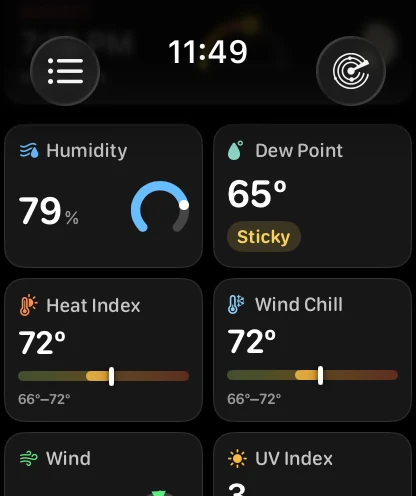
Data points became tiles.
The bottom of the main screen used to be a table of small numbers. It is a grid of tiles now, and each one is drawn the way its reading wants to be read: humidity as a ring that fills, wind as a compass needle, UV as the standard bands, pressure as a trend, dew point as a word you can act on. Seventeen tiles are available and you pick which ones appear, and in what order — and most of them tap through to that reading's chart.
- A ring, compass, band or trend suited to each reading
- Seventeen tiles to choose from, in the order you want
- Tap a tile for its chart; Wind opens the Wind screen
- Tiles or compact rows, whichever fits your wrist
- Air Quality, Tides and Pollen need Gold, and are readings rather than links
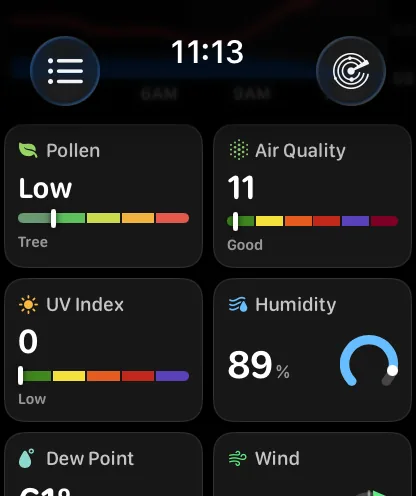
Pollen, on your wrist.
Add the Pollen tile and the watch asks for the pollen reading with the rest of the forecast: the level in a word, a five-band gauge showing where in the scale it falls, and the type actually driving it — tree, grass, weed or mold. It is a US reading from The Weather Company's station network, it is part of Gold, and the tile simply isn't there when there is nothing to report.
- Low through Very High, with the band it sits in
- The type driving it, not just a number
- United States only, and part of Gold
- Asked for only when the tile is on your grid
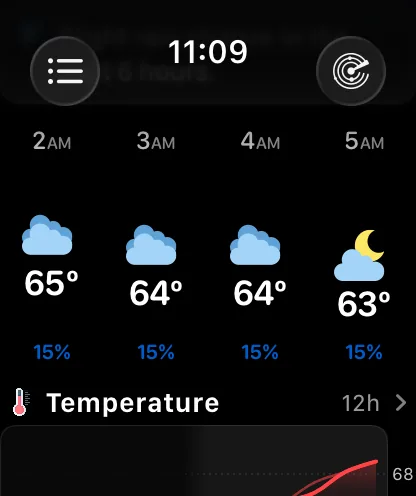
Three ways to draw the same twelve hours.
The hourly strip has a Style setting. Plain is the aligned columns it has always drawn. Curve floats each hour's icon and temperature by how warm that hour is, so the shape of the day reads before any of the numbers do — the same idea as the iPhone's Timeline. Chart replaces the strip with a single curve across the same hours. It syncs with your iPhone like every other layout setting.
- Plain, Curve or Chart — Plain is the default
- Curve puts the warm hours high and the cold ones low
- Chart draws the same window as one curve — tap it for the full charts
- Set it on the watch or in Watch Layout on iPhone
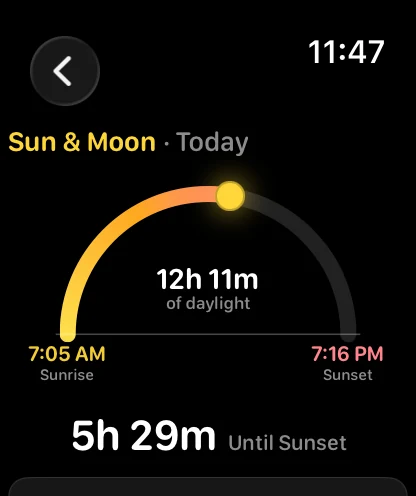
The sun's whole path, and the moon's phase.
Sun & Moon draws the day as an arc with the sun riding it where it actually is, sunrise and sunset at its feet, the length of the day in the middle, and the moon's phase below — the same real-terminator disc the app draws everywhere else. Both are optional sections you can put wherever you like on the main screen.
- Sunrise, sunset and the length of the day
- First and last light, and the moon's phase
- The sun's marker on the arc, morning or midnight
- One moon disc, drawn the same way in every place
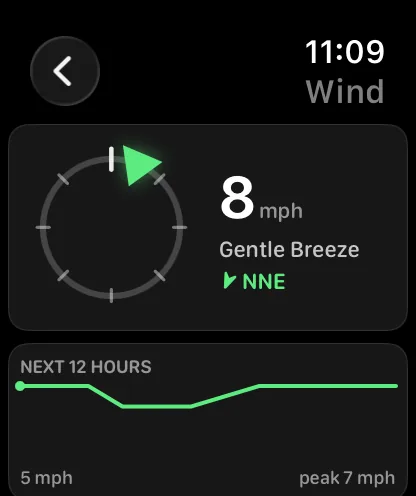
Everything about the wind, on one screen.
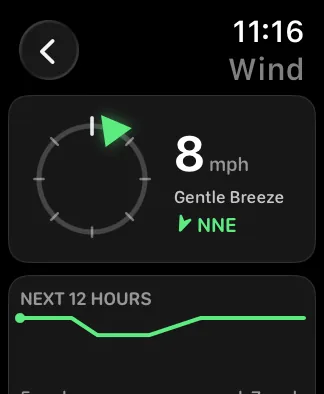
The Wind screen puts the compass and the readings side by side: where it is coming from on the ring, and beside it the speed, the Beaufort description, the direction in your own format and the gusts when there are any. The next twelve hours sit underneath as a sparkline with its low and its peak — no scrolling needed on a 46mm watch.
- Compass and readings together, not stacked
- Speed, description, direction and gusts in one glance
- The next twelve hours, with its low and its peak
- Cardinal, degrees or both — your direction format
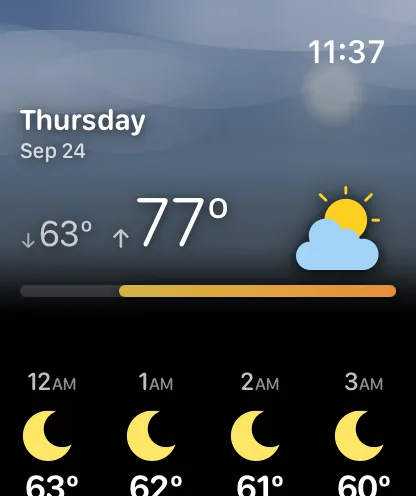
Tap a day, see its whole shape.
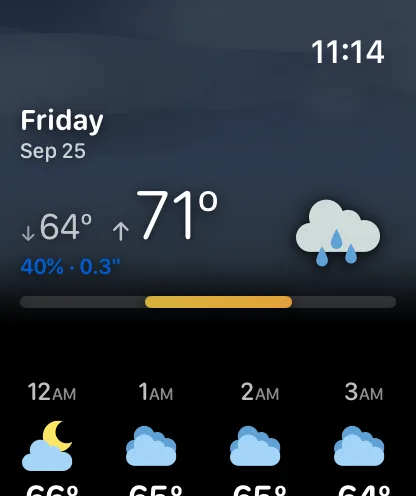
A day's screen opens under a sky tinted for that day's weather, with the date, its low and high, and the chance of rain. Below that: that day's own hourly strip, the narrative forecast, a chart of the day, what the day and the night each hold separately, and the sun and moon for that date. Sunrise and sunset follow the location's own time zone, so a saved city three zones away reads correctly. Swipe between days without going back.
- Every day carries its own hourly strip, not just today
- Day and Night summaries, separately
- A chart of the day on every day's screen
- Sunrise and sunset in the location's own time zone
- Swipe between hours and days in place
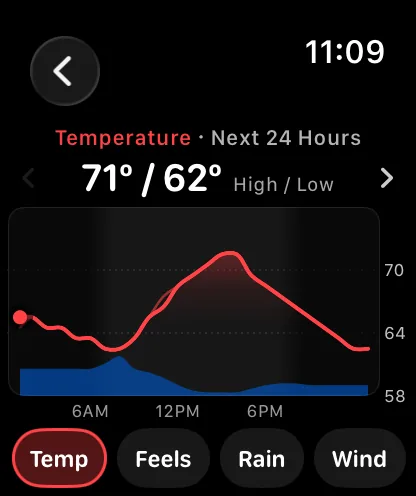
Charts you scrub with the Digital Crown.
Open Charts and the forecast becomes a full-screen curve. Turn the Digital Crown and a dot rides it hour by hour — a click at every hour, the reading following along above. Keep turning past midnight and the chart rolls into tomorrow, and on through the week. Or drag a finger across it: the reading stays put when you lift, so your finger is never covering the number you wanted.
- Twelve data points, heat index and wind chill among them
- Buttons as icons or as names — Temp, Feels, Rain, Wind
- The chance of rain drawn behind the temperature curve
- Night shaded in, fading around sunrise and sunset
- The same curves and colors as the charts on iPhone
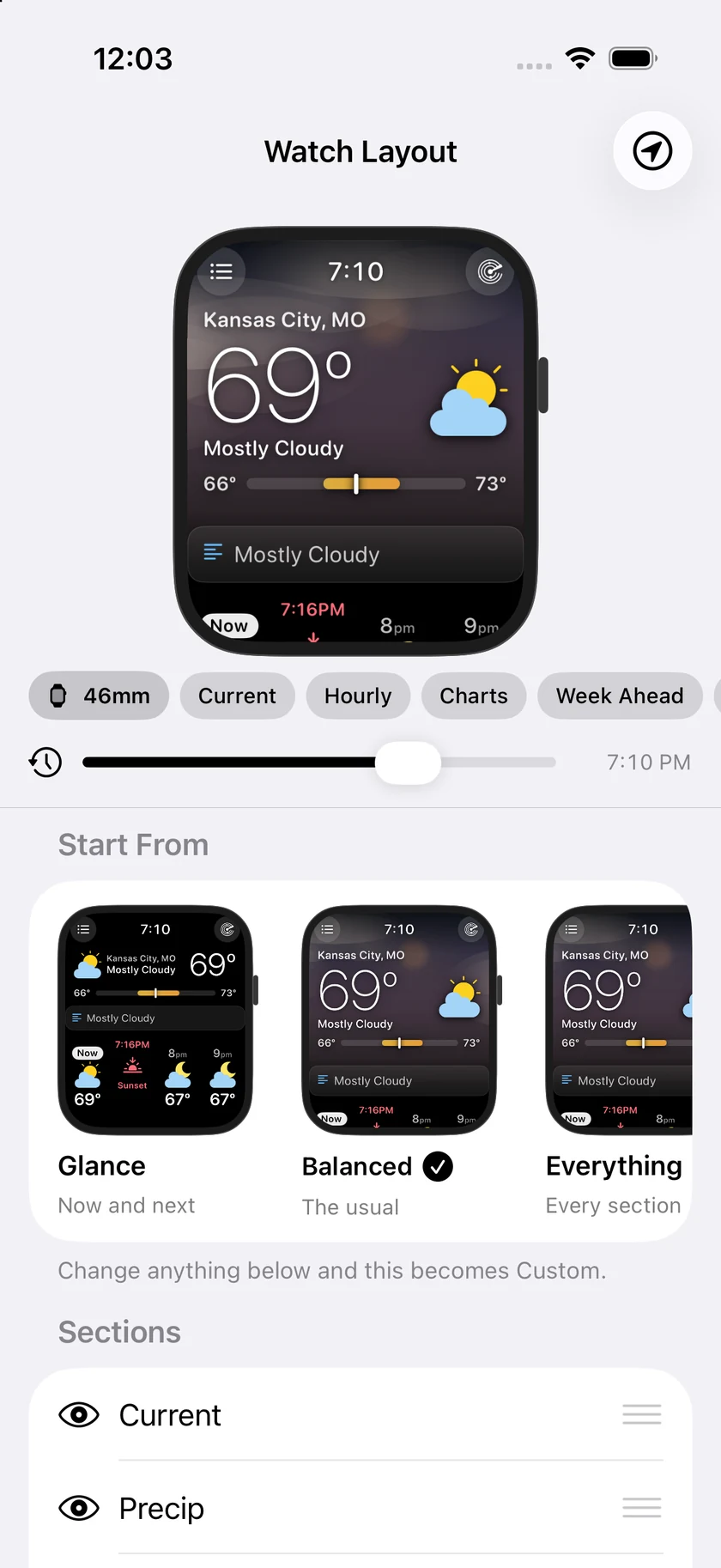
Watch Layout, on your iPhone.
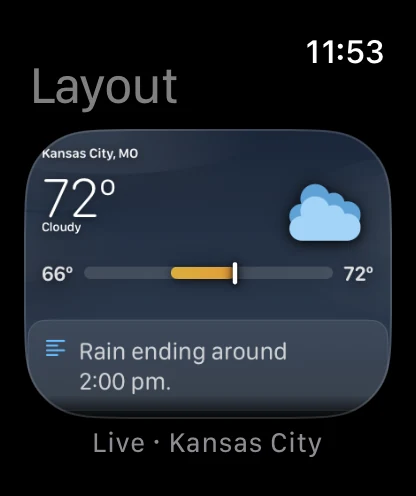
Open Watch Layout on the iPhone and the watch at the top is not a drawing of your watch screen — it is your watch screen, the same code the watch runs, with your weather in it. Reorder a section and it moves. Hide one and it goes. Drag the timeline and the day runs forward: the sky turns from blue to rose to black, the sunset cell slides along the hourly strip, the sun moves down its arc.
- The real watch screen, not a mock-up of it
- A timeline through the whole day, with a Now button
- Preset cards that preview your own layout
- 46mm and 40mm, so you can check the small screen
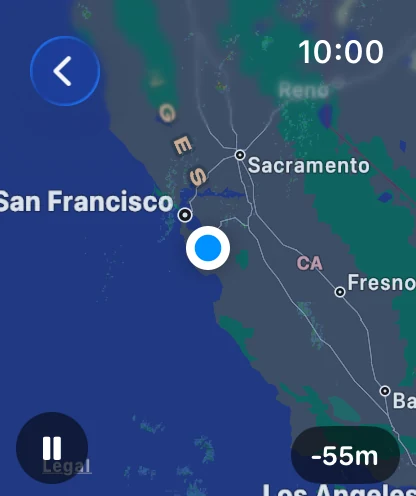
Animated radar, zoomed with the Crown.
Radar on the watch plays roughly the last hour of real observations and the next two hours of forecast, centered on you. Tap to pause; turn the Digital Crown to zoom through six named levels, from your street out to most of the country.
- Past and forecast frames in one loop
- Digital Crown zoom, Street to Country
- Your position marked on the map
- Included with Forecast Bar Gold
One app, however you want it.
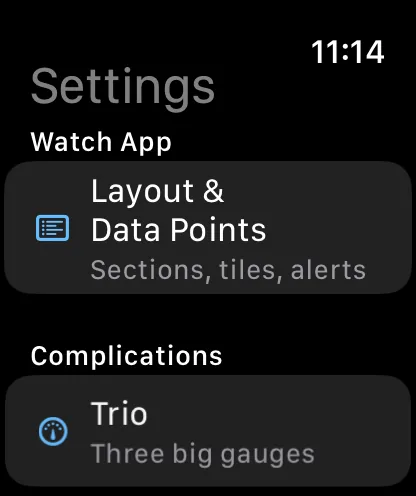
Real captures from the watch app. The sky frames hold the forecast still and move the sun, so the temperature and conditions on them are the live reading.
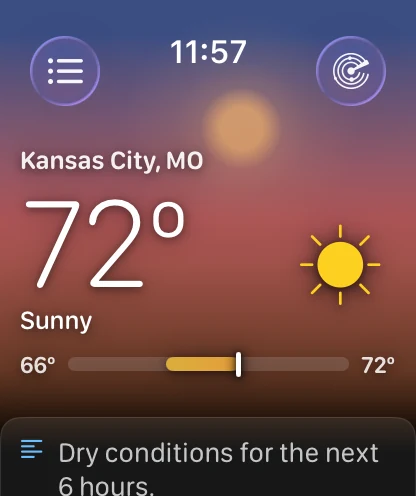
An honest note about the sky.
The sky is colour, light and slow-moving haze — it is not falling rain or snow. We built particles, looked at them on a watch, and took them out again: at that size a thin streak reads as a scratch on the screen rather than weather. Rain and snow are carried by the colour, the condition icon and the precipitation card instead.
It also knows when to stop moving. With Always On, Low Power Mode or Reduce Motion, the sky holds still. If you would rather it never moved, or never appeared at all, Layout → Header has Still Sky and Compact.
Questions about Forecast Bar on Apple Watch
Does Forecast Bar have an Apple Watch app?
Does the watch app work without my iPhone nearby?
Will the watch show me an old forecast when I open it?
Can I rearrange the watch app's main screen?
What is Watch Layout on the iPhone?
Does the animated sky drain the battery?
How do the charts work on Apple Watch?
Does the watch show minute-by-minute rain?
Can I change how the hourly strip looks?
Do I need a separate subscription for Apple Watch?
How much does Forecast Bar cost?

Put the whole forecast on your wrist.
The watch app is included with Silver and Gold — and every iOS plan starts with a free trial week.
Free to download; live weather requires a subscription. On iPhone and iPad, every subscription includes a 7-day free trial for new subscribers; Mac plans do not. Mac and iOS plans are separate; Apple TV is included with Forecast Bar Gold on iOS.
More from Forecast Bar
Apple Watch complications
Build a watch face around your weather, across every complication family.
Weather radar for iPhone & iPad
Animated radar with future radar, live lightning, satellite, and warning polygons on the map.
Weather app for iPad
The full forecast, charts and radar with room to breathe — plus widgets in every iPad size.