Radar in Forecast Bar, in short
- Animation
- Smooth animated playback of recent radar frames, with future radar showing where the precipitation is forecast to go.
- Layers
- Precipitation, satellite, live lightning strikes, and active weather warnings — layerable on one map.
- Warnings
- Active NWS and Environment Canada warnings are drawn as polygons, so you can see whether one covers you.
- Widgets
- Radar can live in a Home Screen widget, and as a mini radar map on the main screen.
- Platforms
- iPhone, iPad, Mac (in a standalone window), and Apple TV.
- Plan
- Animated radar is in Silver and above; extended radar, advanced layers, and radar widgets are Gold.
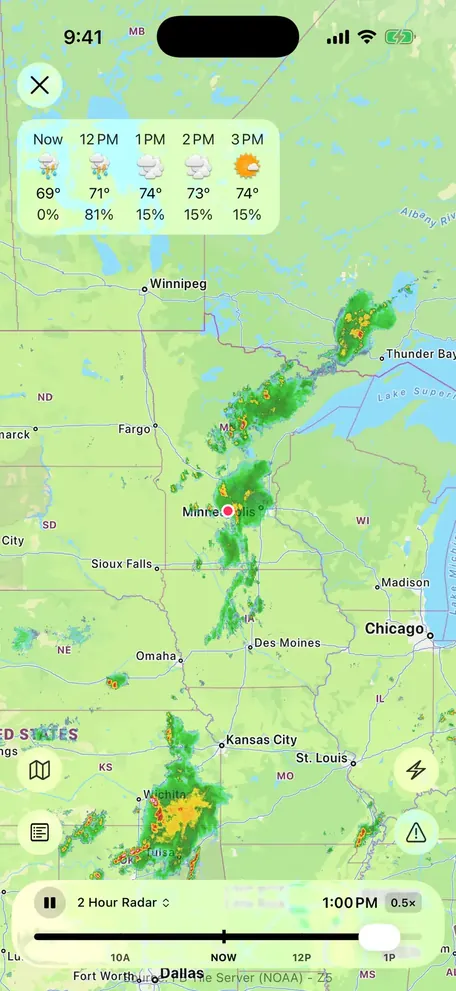
Future radar answers the question you're actually asking.
Looking at where rain has been is a proxy for the thing you want to know: whether it's going to hit you. Future radar shows the forecast position of the precipitation, so you can see whether the band clips you or misses.
- Smooth animated playback of recent frames
- Future radar showing forecast movement
- Scrub through the timeline at your own pace
- Zoom to street level or out to the whole system

Lightning, satellite, and warnings on the same map.
Precipitation radar tells you about rain. It doesn't tell you whether that cell is electrically active, whether the cloud deck is breaking up, or whether the county you're driving into is under a warning. Layers do.
- Live lightning strike locations
- Satellite imagery for cloud structure
- Active warning polygons from the NWS and Environment Canada
- Advanced layers for the kind of day that needs them

Radar as a Home Screen widget.
The fastest radar check is the one that doesn't involve launching an app. Forecast Bar's radar widgets put a live map on your Home Screen, and a mini radar map sits on the main screen for the glance in between.
- Home Screen radar widgets
- Mini radar map on the main screen
- On Mac, a standalone radar window that stays on your desktop
- On Apple TV, radar on the biggest screen in the house
An honest note: radar coverage isn't uniform worldwide.
Radar networks are national infrastructure, and their density varies. Coverage is excellent across the United States and good across much of Europe; in parts of the world there is little ground radar at all, and what you see leans on satellite-derived data instead.
Warning polygons are the more clearly bounded case: those come from the US National Weather Service and Environment and Climate Change Canada, so they appear for the US and Canada only.
Questions about weather radar
Does Forecast Bar have animated weather radar?
What is future radar?
Can Forecast Bar show lightning strikes?
Are weather warnings shown on the radar map?
Is there a radar widget for the Home Screen?
Does the radar work outside the United States?
How much does Forecast Bar cost?

See where the storm is going.
Put animated radar, future radar and lightning to work free for 7 days with any new iPhone or iPad subscription.
Free to download; live weather requires a subscription. On iPhone and iPad, every subscription includes a 7-day free trial for new subscribers; Mac plans do not. Mac and iOS plans are separate; Apple TV is included with Forecast Bar Gold on iOS.
More from Forecast Bar
Weather radar for Mac
A standalone radar window with future radar, live lightning, satellite, and warnings on the map.
Severe weather alerts
NWS and Environment Canada warnings at the moment of issue, plus storm tracking that counts a storm down to your door.
Rain alerts & precipitation nowcasts
Know before it starts, and watch it minute by minute on your Lock Screen once it does.