Hurricane tracking in Forecast Bar, in short
- Forecast cone
- Forecast Bar draws the National Hurricane Center's forecast cone for each active storm on its radar map, with the storm's past track and forecast points.
- Strength
- Forecast Bar marks the forecast points along a storm's track by category, and tapping the storm lists its forecast classification and wind speed at each point.
- Storm details
- Tapping a storm in Forecast Bar shows its maximum sustained wind, minimum pressure, movement and latest advisory, with a link to the NHC public advisory.
- Coastal watches and warnings
- Forecast Bar draws hurricane and tropical storm watches and warnings as colored lines along the coast.
- Formation odds
- Forecast Bar's Tropical Outlook layer shows the National Hurricane Center's 7-day areas where a storm may form, each with its odds.
- Main screen card
- When the location you're viewing is in a forecast cone, a card on Forecast Bar's main screen names the storm. If it's outside any cone but NHC puts the chance of tropical-storm-force winds there at 10% or more within 5 days, the card shows those odds.
- Coverage
- Forecast Bar's hurricane tracking covers the Atlantic, East Pacific and Central Pacific. Guam and the western Pacific are not covered.
- Platforms
- Hurricane tracking is in Forecast Bar for iPhone, iPad, Mac and Apple TV.
- Plan
- Hurricane tracking is part of Forecast Bar Gold on iPhone, iPad and Apple TV, and Pro on the Mac.
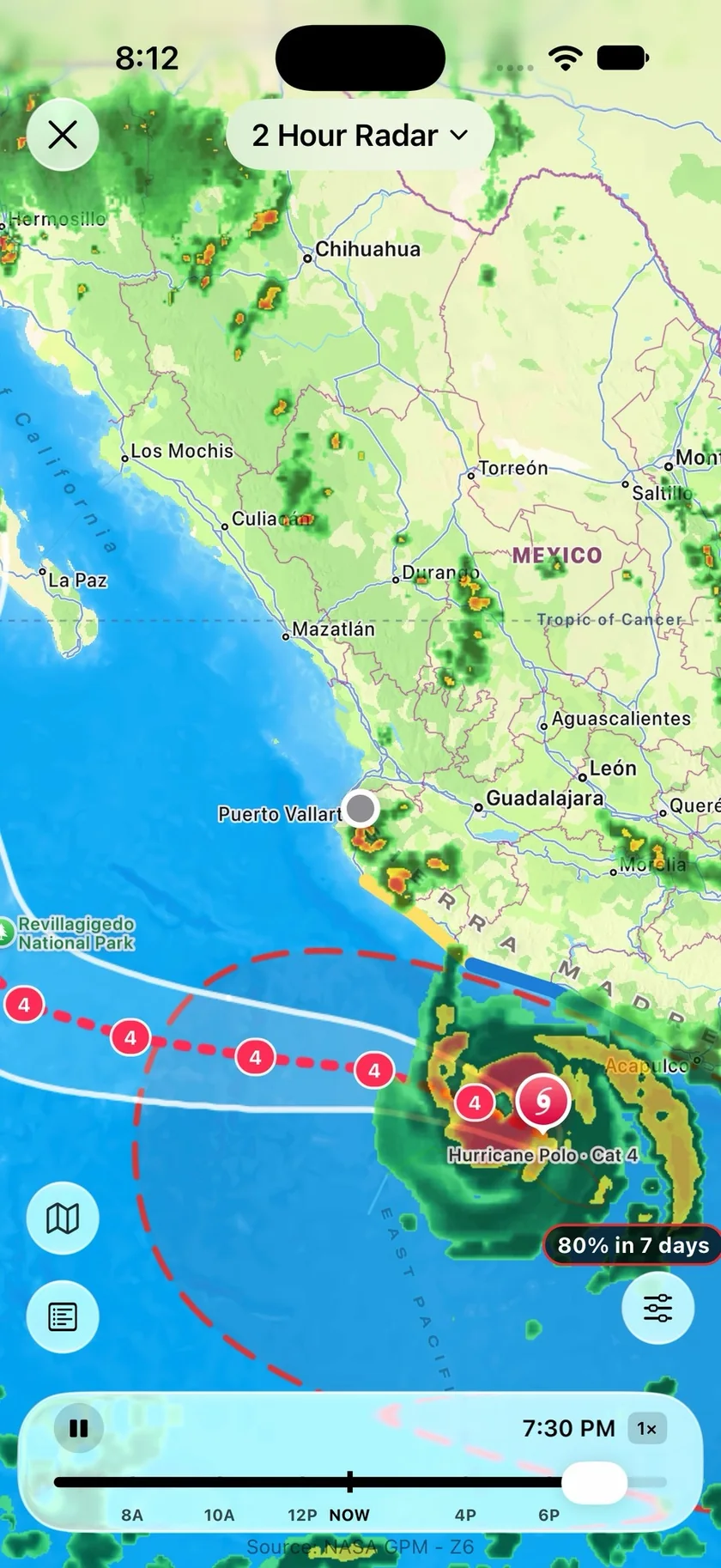
See the storm on the map you already check.
Turn on Active Storms in the radar's Overlays and each live storm appears with its forecast cone, its past track and the points it's forecast to pass through. The rain around it stays on the same map, so you're not switching between a tracker and a radar.
- The National Hurricane Center's cone for each active storm
- Past track and forecast points, marked by category
- Tropical Outlook areas labeled with their odds, like 80% in 7 days
- The Tropical View sets satellite, storms, outlook and warnings in one tap
- Both layers can stay on before a storm forms
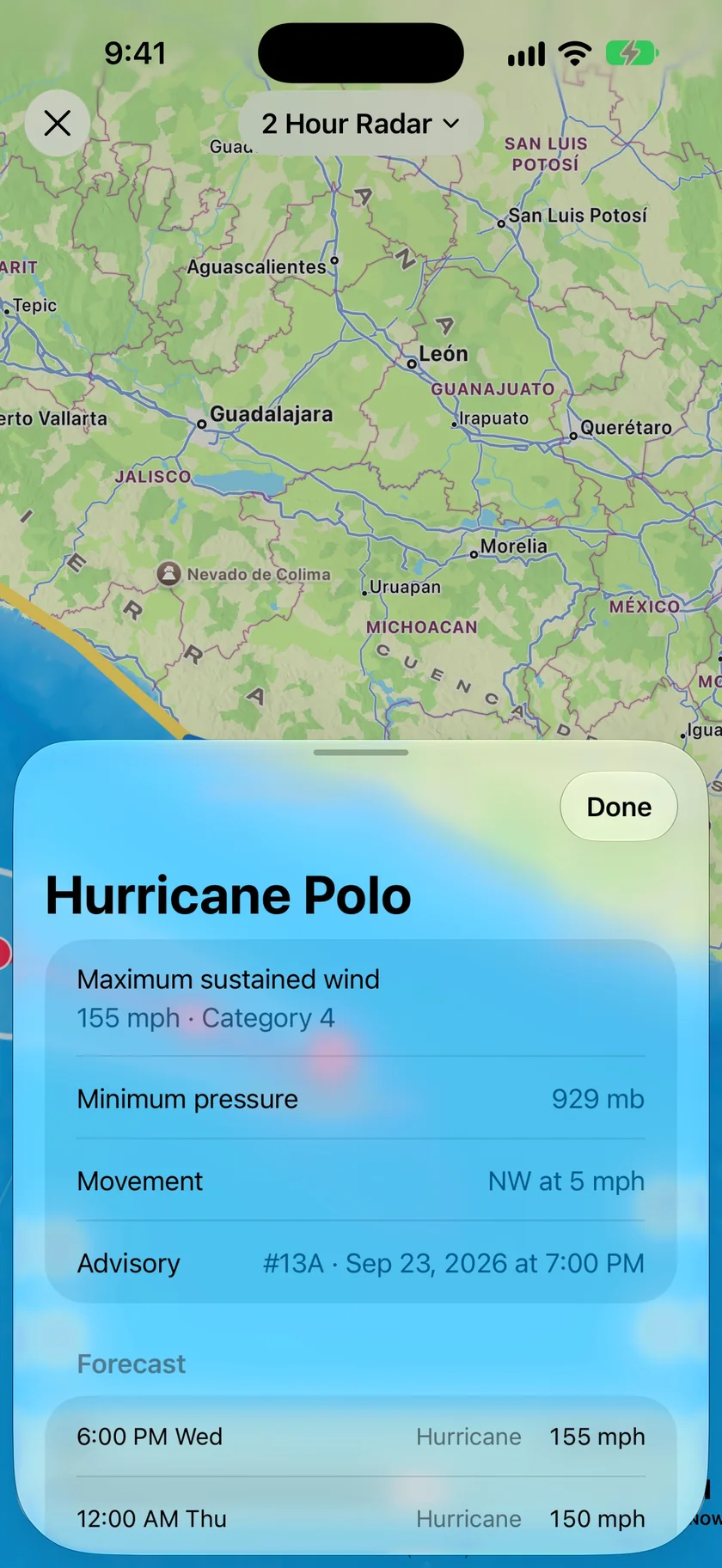
How strong it is now, and how strong it's forecast to be.
Tap a storm or its cone for the figures from the latest advisory. Below them, the forecast runs point by point, so you can see whether the storm is expected to hold, build or fade as it moves.
- Maximum sustained wind, with the category
- Minimum pressure and movement
- Advisory number and time
- Forecast classification and wind at each point
- A link to the NHC public advisory on iPhone, iPad and Mac
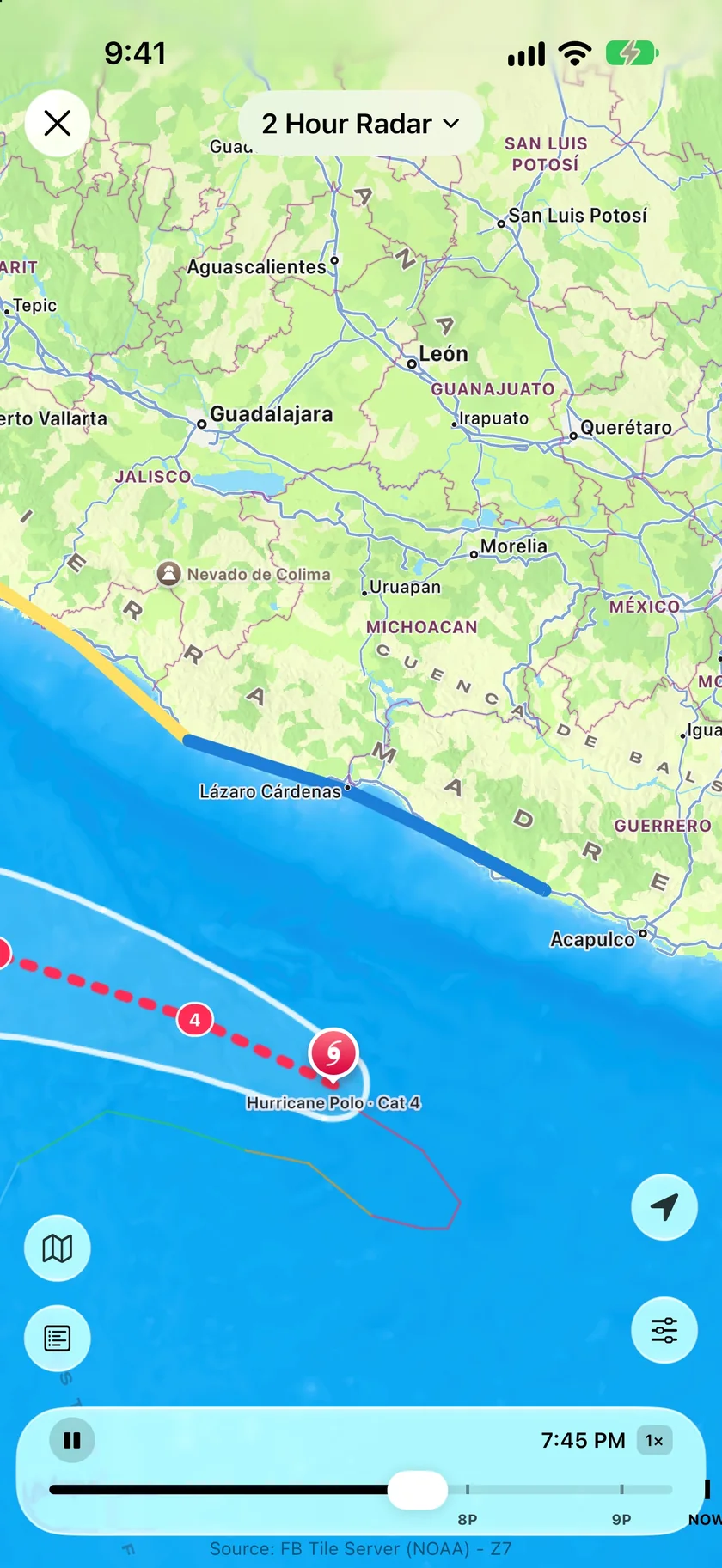
Which stretch of shoreline is under a watch.
Coastal watches and warnings are drawn as lines on the shore, so you can find your own beach on them instead of reading a list of place names. They appear only when they match the storm's latest advisory. While a new advisory is on its way, the storm's sheet says the coastal watches are updating.
- Hurricane warnings in red, hurricane watches in pink
- Tropical storm warnings in blue, tropical storm watches in yellow
- A legend that explains the cone on the map
- Older data is labeled as not the latest advisory
An honest note: what the cone does and doesn't tell you.
The cone shows where a storm's center will probably go. Wind, surge and rain can reach well outside it, so being just beyond the edge doesn't make you safe. Forecast Bar shows that same warning beside the cone in the app.
Tracking covers storms the National Hurricane Center and the Central Pacific Hurricane Center follow, in the Atlantic, East Pacific and Central Pacific. Typhoons in the western Pacific, including around Guam, are not covered.
Official hurricane, tropical storm and storm surge warnings arrive as Severe Weather Alerts, which are a separate feature for the US and Canada. Follow your local officials on evacuations and shelter; a map can't make that call.
Questions about hurricane tracking
Does Forecast Bar show the official hurricane forecast cone?
Which oceans does Forecast Bar's hurricane tracking cover?
What does a hurricane's forecast cone mean?
Can I see where a hurricane might form?
Will Forecast Bar warn me about a hurricane?
Does hurricane tracking work on Mac and Apple TV?
How much does Forecast Bar cost?

See where the storm is heading.
Hurricane tracking needs Gold on iPhone and iPad, or Pro on the Mac. New iPhone and iPad subscribers can try it free for 7 days.
Free to download; live weather requires a subscription. On iPhone and iPad, every subscription includes a 7-day free trial for new subscribers; Mac plans do not. Mac and iOS plans are separate; Apple TV is included with Forecast Bar Gold on iOS.
More from Forecast Bar
Storm tracker app
Whether a storm is on track for you, when it arrives, its severe and tornado odds, and hail size, with a Lock Screen countdown.
Severe weather alerts
NWS and Environment Canada warnings at the moment of issue, plus storm tracking that counts a storm down to your door.
Weather radar for iPhone & iPad
Animated radar with future radar, live lightning, satellite, and warning polygons on the map.