Storm tracking in Forecast Bar, in short
- The verdict
- Forecast Bar's Storm Tracker card leads with whether a storm is on track for you or expected to miss you. A storm on track gets a live countdown to arrival; one that will miss shows how close it should come.
- When it appears
- The Storm Tracker card appears when a tracked storm with at least a 30% chance of severe weather is projected to pass within 10 miles in the next hour.
- Severe odds
- Forecast Bar shows each storm's chance of large hail, damaging winds or a tornado within the hour, from NOAA/CIMSS ProbSevere guidance.
- Hail and tornado
- The Storm Tracker card flags a tornado chance of 10% or more and estimated hail of half an inch or larger.
- Lock Screen
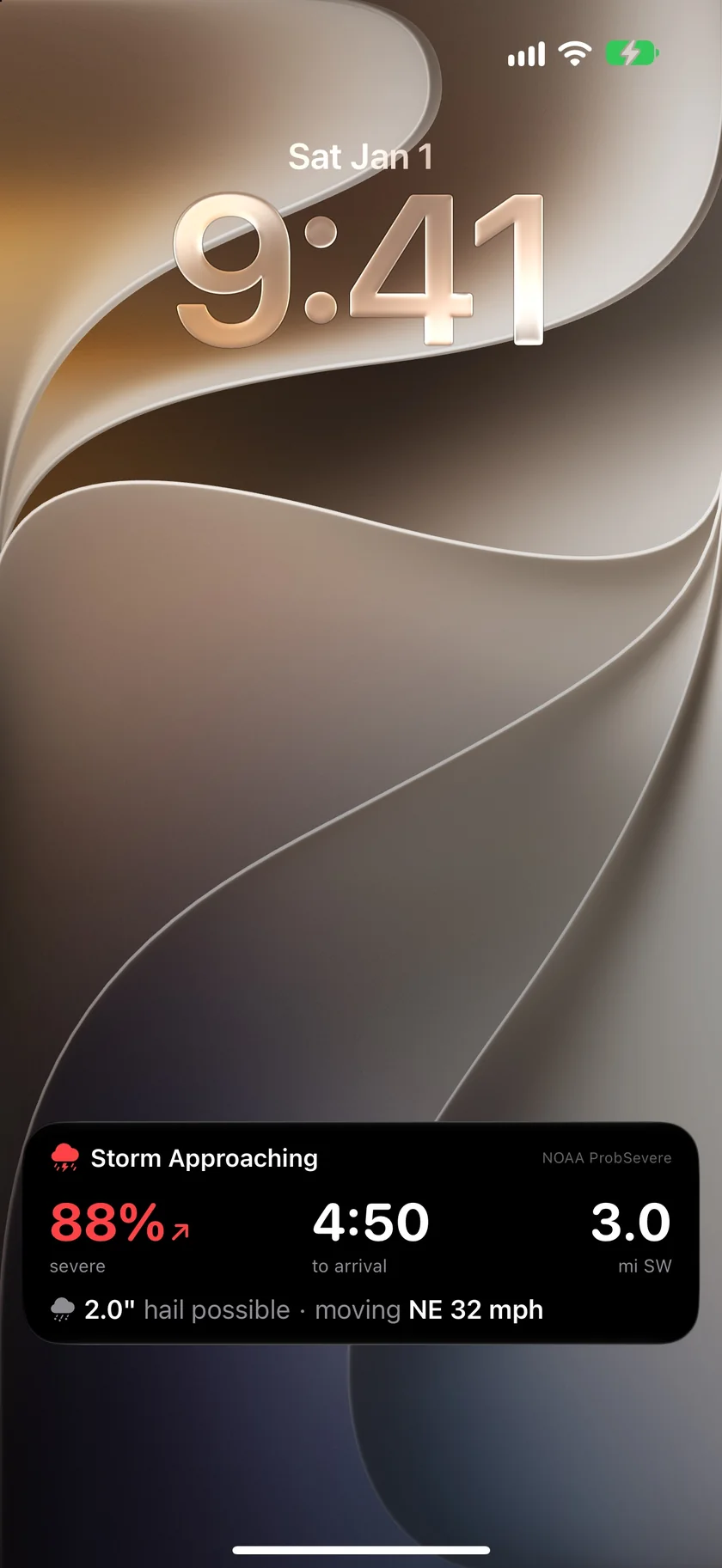
- Storm Intercept follows a storm closing on you on the iPhone Lock Screen and in the Dynamic Island, with a countdown that keeps ticking between updates. It requires iOS 17.2 or later.
- Storm Cells
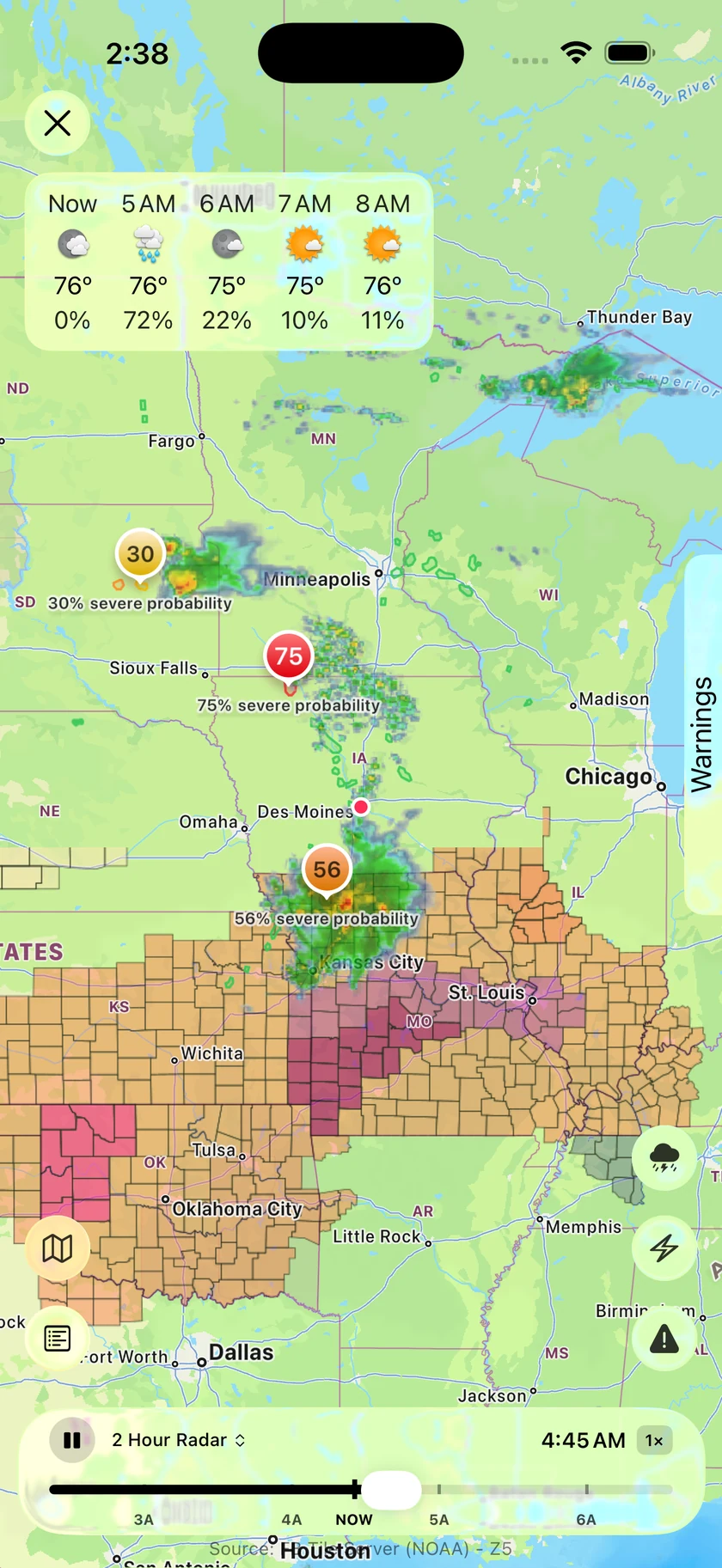
- Forecast Bar's Storm Cells overlay draws tracked storms on the radar with their severe probability. Tapping one shows its hail, wind and tornado odds, motion, trend and storm structure.
- Storm alerts
- Forecast Bar's Severe Storm and Large Hail alerts start at a 50% severe chance and one-inch hail, and you can change the threshold or how close a storm must be projected to come.
- Storm Reports
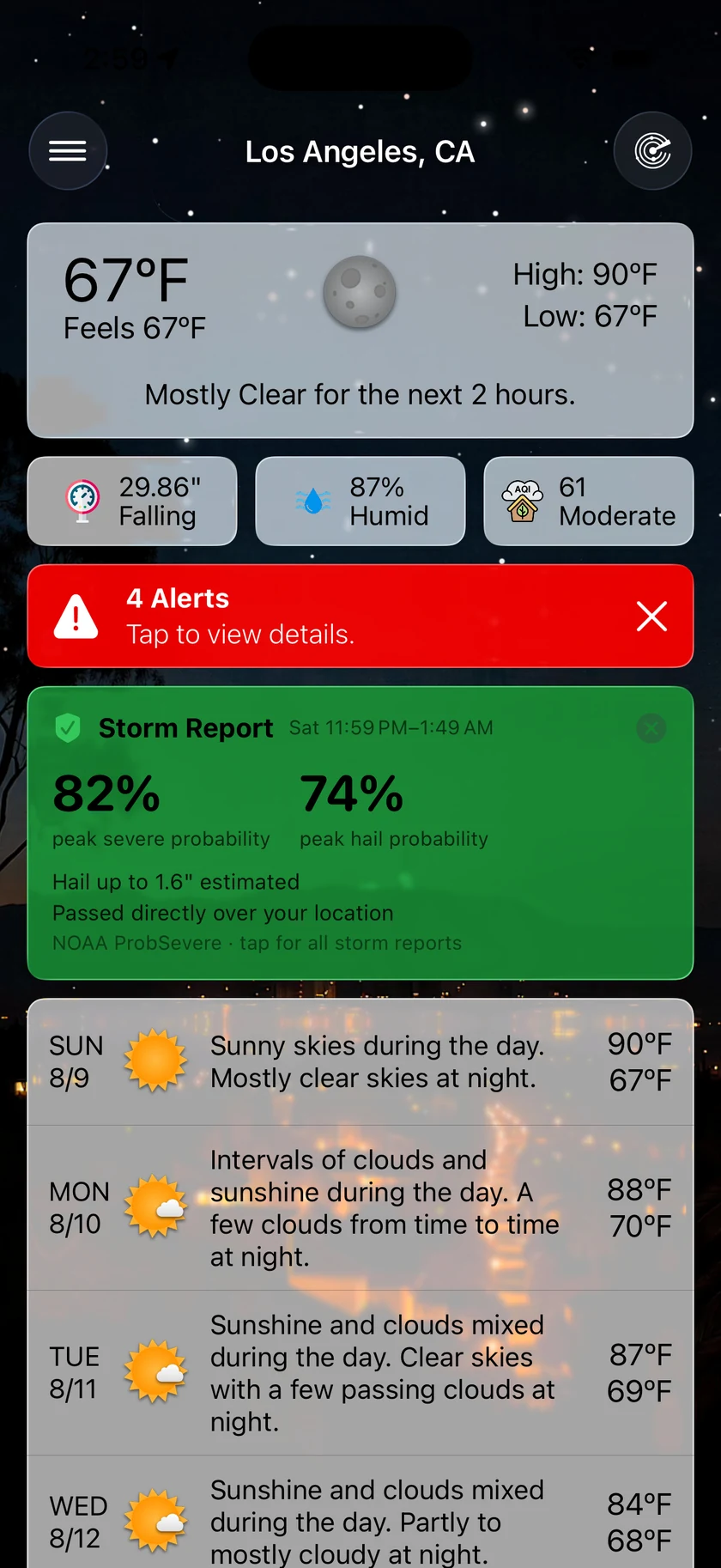
- After a tracked storm passes close to you, Forecast Bar records the date, estimated hail size and closest approach, and keeps the report for two years.
- Coverage
- Forecast Bar's storm tracking covers the contiguous United States.
- Plan
- Storm tracking is part of Forecast Bar Gold on iPhone, iPad and Apple TV, and Pro on the Mac. Storm Intercept is on iPhone only.
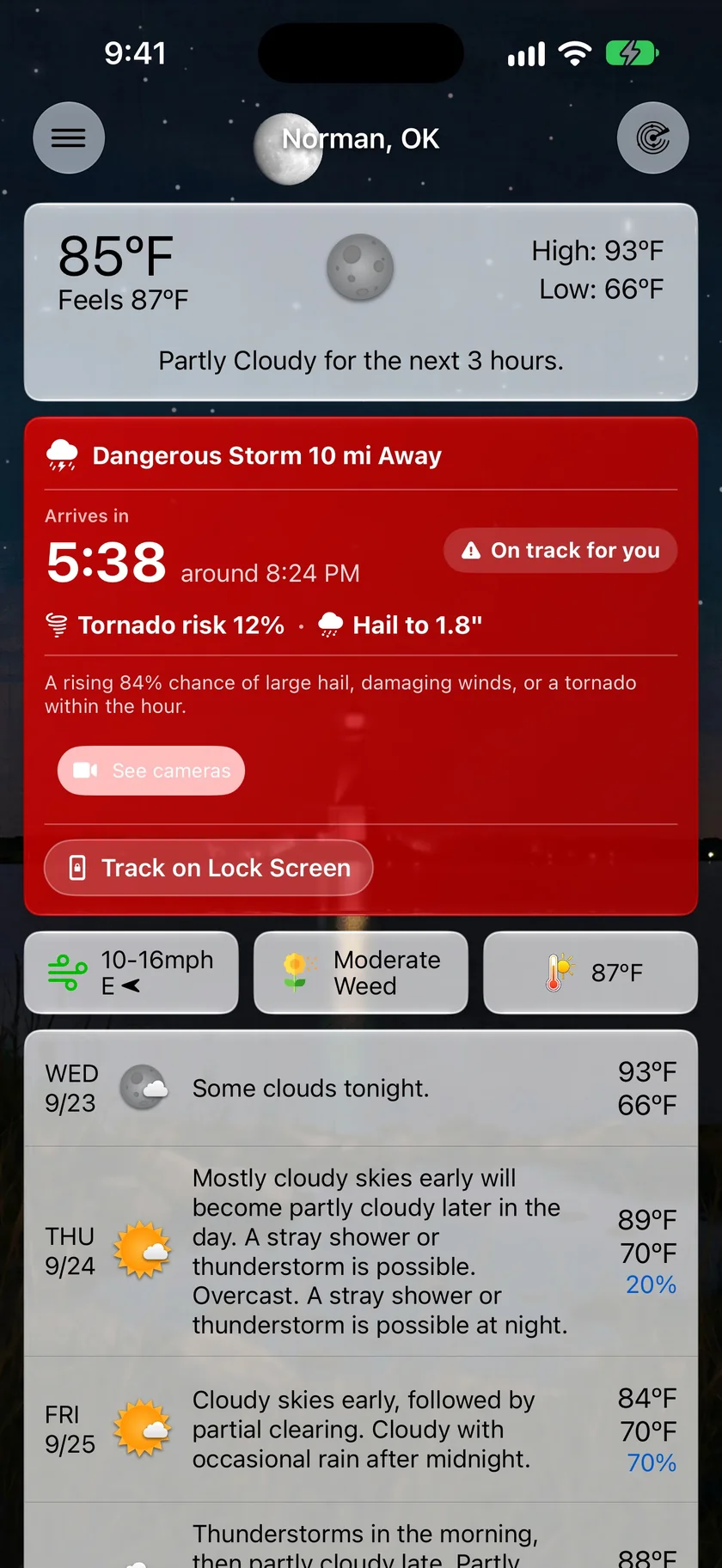
On track for you, or expected to miss.
A red blob on the radar leaves the real question to you. The Storm Tracker card answers it. It sits at the top of the forecast when a storm is closing on the location you're viewing, and it says when the storm should arrive. If the storm will pass by, it says that too, with how close it should come and no ticking clock.
- A live countdown, and the clock time it should arrive
- The chance of large hail, damaging winds or a tornado within the hour
- Tornado risk and estimated hail size when they're significant
- Tap the card to open the radar with that storm selected
- Track on Lock Screen starts Storm Intercept in one tap on iPhone
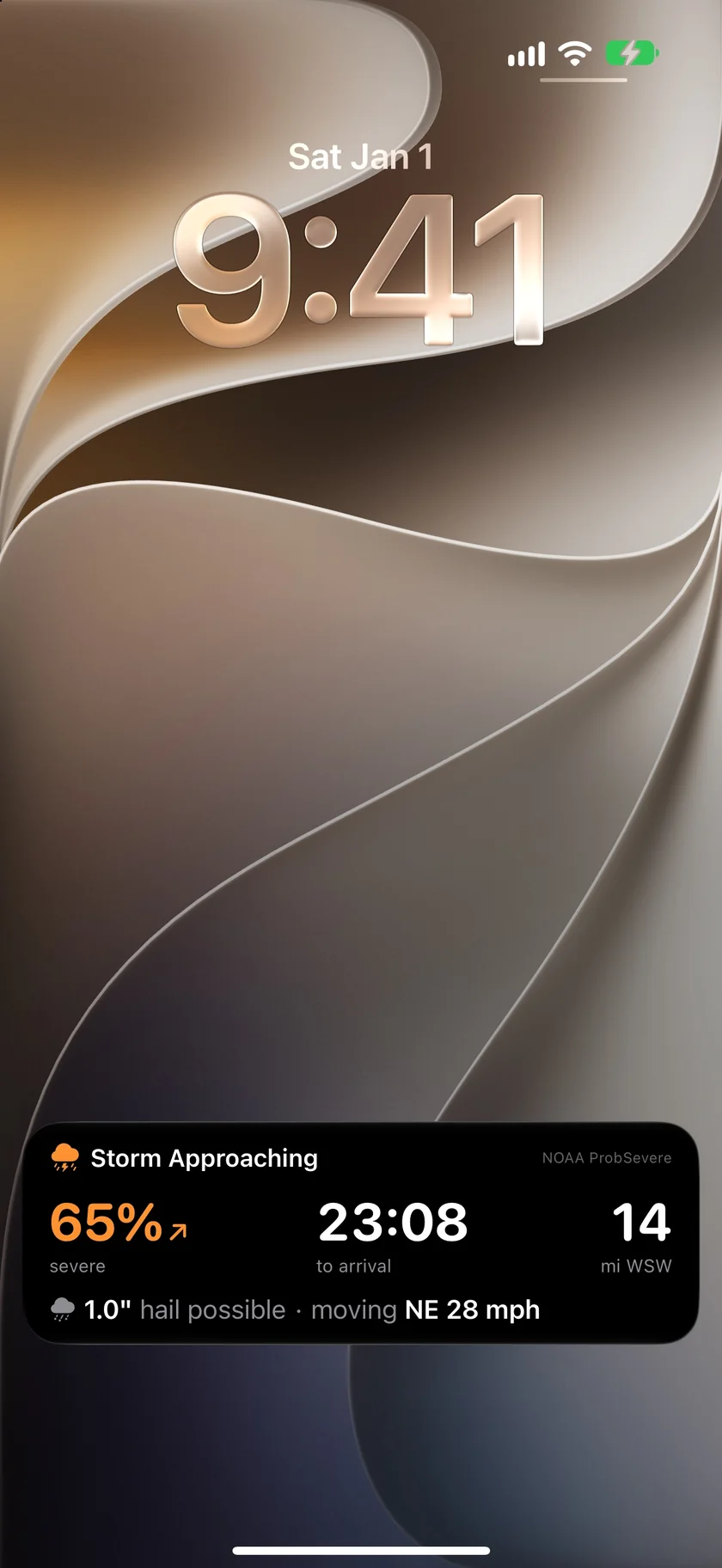
A countdown on your Lock Screen.
Once it's turned on, Storm Intercept starts by itself when a storm meets the level you chose, and stays on the Lock Screen and in the Dynamic Island while it approaches. The severe odds, distance and hail size update as new guidance arrives, and the countdown keeps running in between. If the storm is going to miss you, it says so and gets out of the way.
- Severe chance with a trend arrow
- Time to arrival, or to the closest pass
- Distance, direction, estimated hail size and storm motion
- Rarely, Normal or Often sets how readily it starts
- Mirrors to the Apple Watch Smart Stack
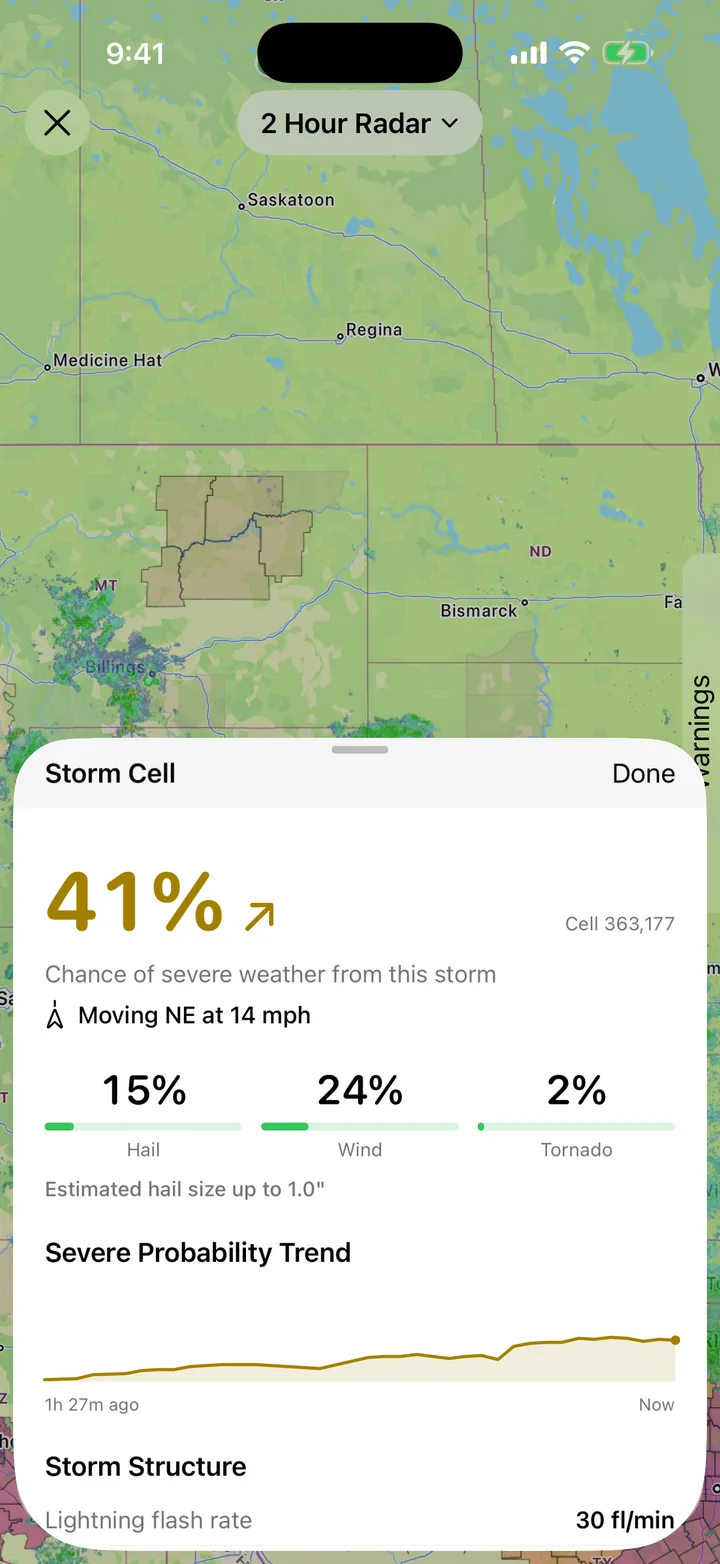
Which storm in the line is the one to watch.
Tap a storm on the radar and the cell inspector opens with what's known about that one storm. Its severe chance splits into hail, wind and tornado, and a trend line shows whether the storm has been building or fading. For anyone who wants the meteorology, storm structure and environment readings sit underneath.
- Severe chance, with hail, wind and tornado odds
- Estimated hail size and storm motion
- Severe probability trend over recent scans
- Lightning flash rate, echo top and low-level rotation when available
- Local Storm Reports add reported hail, wind and tornadoes to the map
From the map to the morning after.
An honest note: this is guidance, not a warning.
The probabilities come from NOAA/CIMSS ProbSevere, an automated system that updates every few minutes. They describe a storm's potential. They are not National Weather Service warnings and they don't replace them. Forecast Bar's official alerts are a separate feature, and a storm can be tracked with no warning in force, or the other way round.
Arrival times assume a storm keeps moving the way it has been moving, and storms turn, split, weaken and form quickly. Treat the countdown as an estimate, and follow official warnings when they're issued.
Storm tracking covers the contiguous United States. It doesn't cover Alaska, Hawaii or other countries.
Questions about storm tracking
Can Forecast Bar tell me when a storm will reach me?
Does Forecast Bar track tornadoes?
How does Forecast Bar know the hail size?
What is Storm Intercept?
Can I get a notification when a storm is close?
Does storm tracking work on the Mac?
How much does Forecast Bar cost?

Find out which storm is the one to watch.
Storm tracking needs Gold on iPhone and iPad, or Pro on the Mac. New iPhone and iPad subscribers can try it free for 7 days.
Free to download; live weather requires a subscription. On iPhone and iPad, every subscription includes a 7-day free trial for new subscribers; Mac plans do not. Mac and iOS plans are separate; Apple TV is included with Forecast Bar Gold on iOS.
More from Forecast Bar
Severe weather alerts
NWS and Environment Canada warnings at the moment of issue, plus storm tracking that counts a storm down to your door.
Weather radar for iPhone & iPad
Animated radar with future radar, live lightning, satellite, and warning polygons on the map.
Flash flood alerts
Official flood warnings, NOAA's excessive rainfall outlook, river gauges, and an alert when flood risk rises where you are.