New in Forecast Bar 11.9.
Adding trips by hand, Add as Trip, the Find Trips in Calendar switch and syncing your trips across devices all arrive with version 11.9, which is on its way to the App Store. So does Upcoming Travel on the Mac. Finding trips on your calendar is already in the app on iPhone and iPad.
Upcoming Travel, in short
- What it is
- Upcoming Travel is a card on Forecast Bar's main screen with the high, low and conditions for the first day of each upcoming trip.
- Where trips come from
- Forecast Bar finds trips in calendar events that have an address, and from version 11.9 you can add a trip by hand with a place and two dates.
- How far ahead
- A trip added by hand appears once it starts within 14 days. Calendar trips follow the Look Ahead setting of 3, 7, 10 or 14 days, which starts at 7.
- What counts as a trip
- A calendar event counts when it is at least the Trip Distance from you: 50, 100, 250 or 500 miles, starting at 100. Online meetings and events without an address are skipped.
- Someone else's trip
- You can add a trip you aren't taking, such as a family member's, and watch the forecast where they're going.
- Calendar access
- Upcoming Travel is off until you turn it on. From version 11.9, turning off Find Trips in Calendar means the calendar is never read or asked for.
- Plan
- Upcoming Travel needs Forecast Bar Gold on iPhone and iPad, and Pro on the Mac.
- Platforms
- Upcoming Travel is on iPhone and iPad, and comes to the Mac in version 11.9.
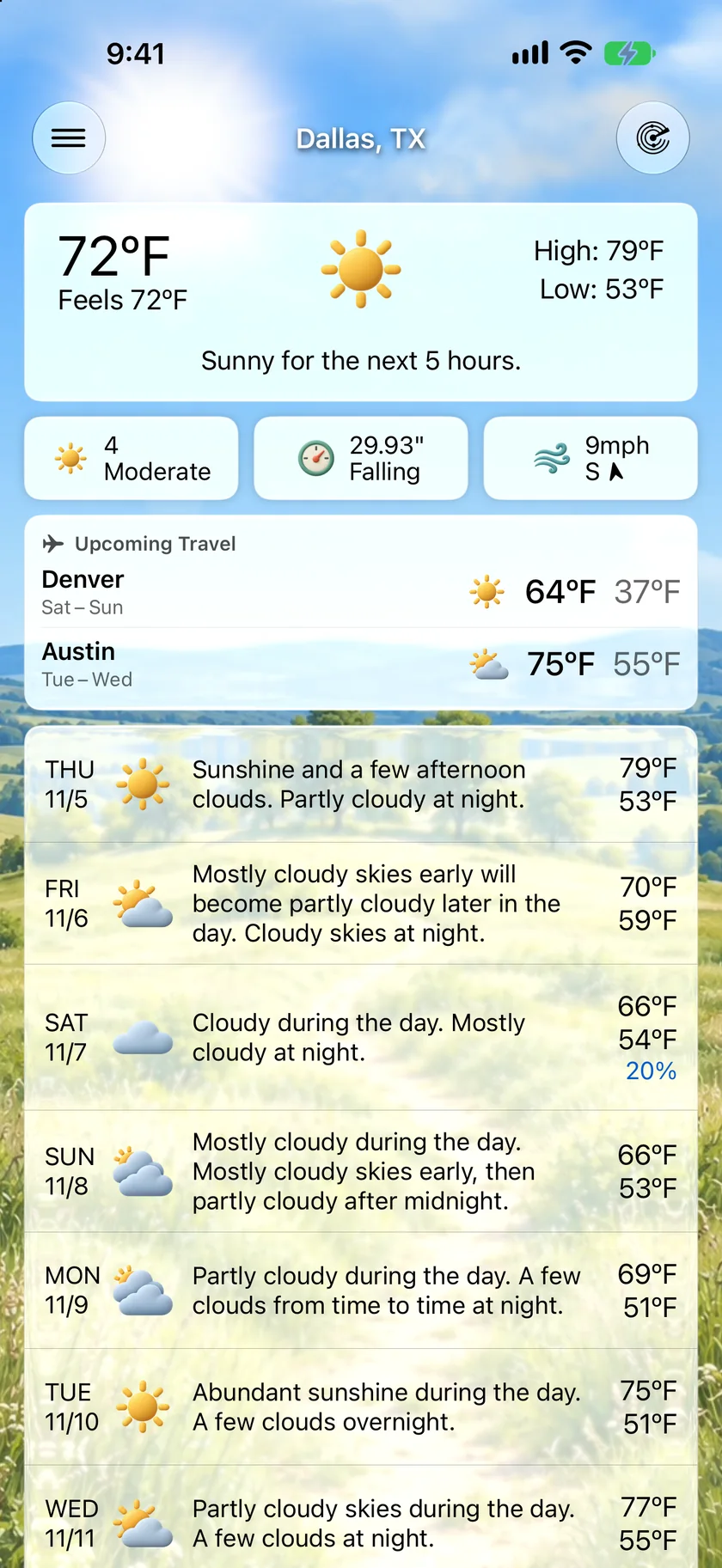
Every trip, right above your forecast.
Your next trips sit between today's conditions and the week ahead, each with its place, its dates and the forecast for the first day you're there. You see Denver turning cold without searching for Denver, and the packing decision makes itself.
- Up to three trips, soonest first
- The high, low and conditions for each trip's first day
- Off until you turn it on in Settings
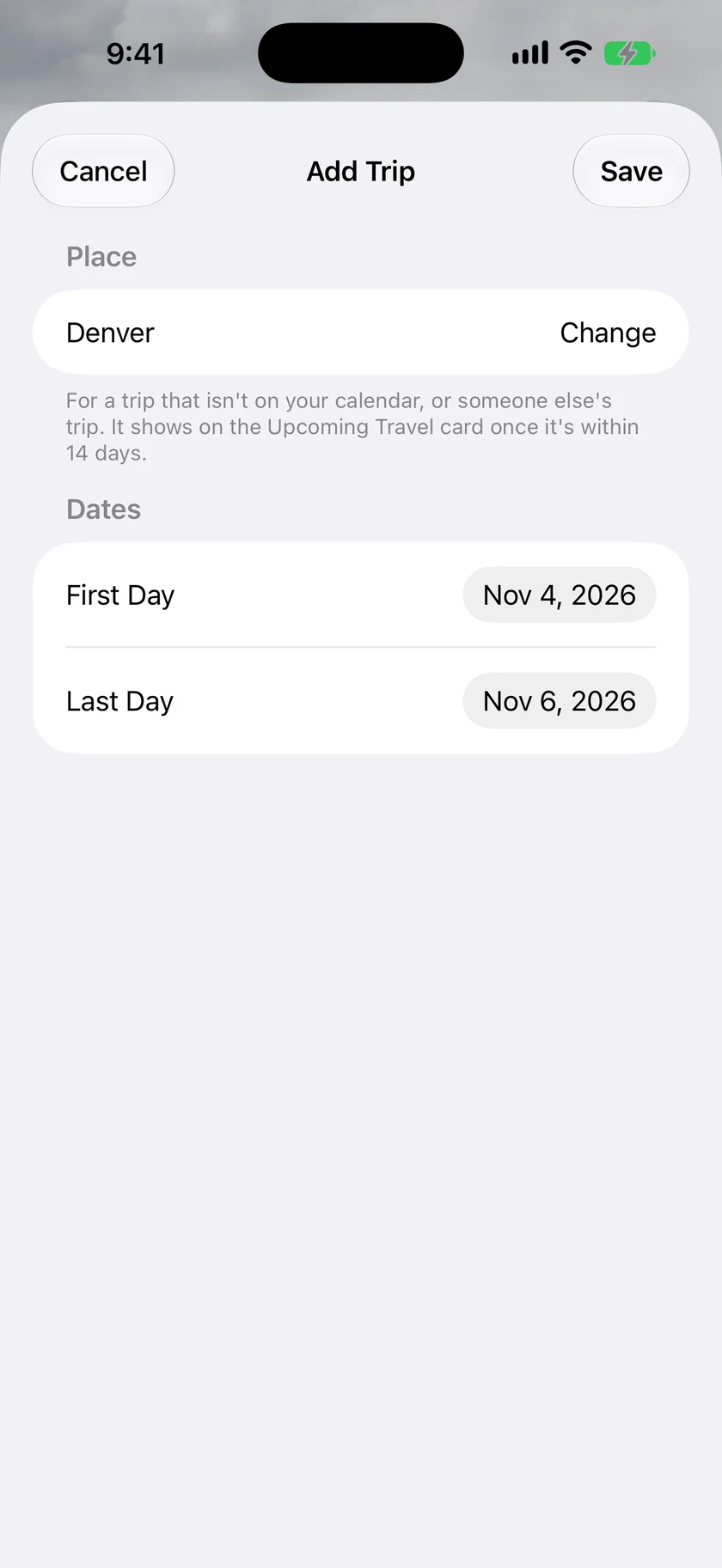
Let your calendar find the trip, or add it yourself.
Turn on Upcoming Travel and Forecast Bar looks through the calendars you choose for events with an address far enough from where you are. A conference in Denver becomes a row on your main screen with that day's high, low and conditions. The road trip nobody put on a calendar only needs a place, a first day and a last day.
- Stops in the same area, a day or so apart, merge into one trip
- Cancelled events, events you declined and online meetings are left out
- Add as Trip turns a search result into a trip, in location search and the Locations gallery
- Add a trip for someone else and keep an eye on where they're headed
- Tap a trip to open it beside the place on your main screen, with Now, Hourly and Daily
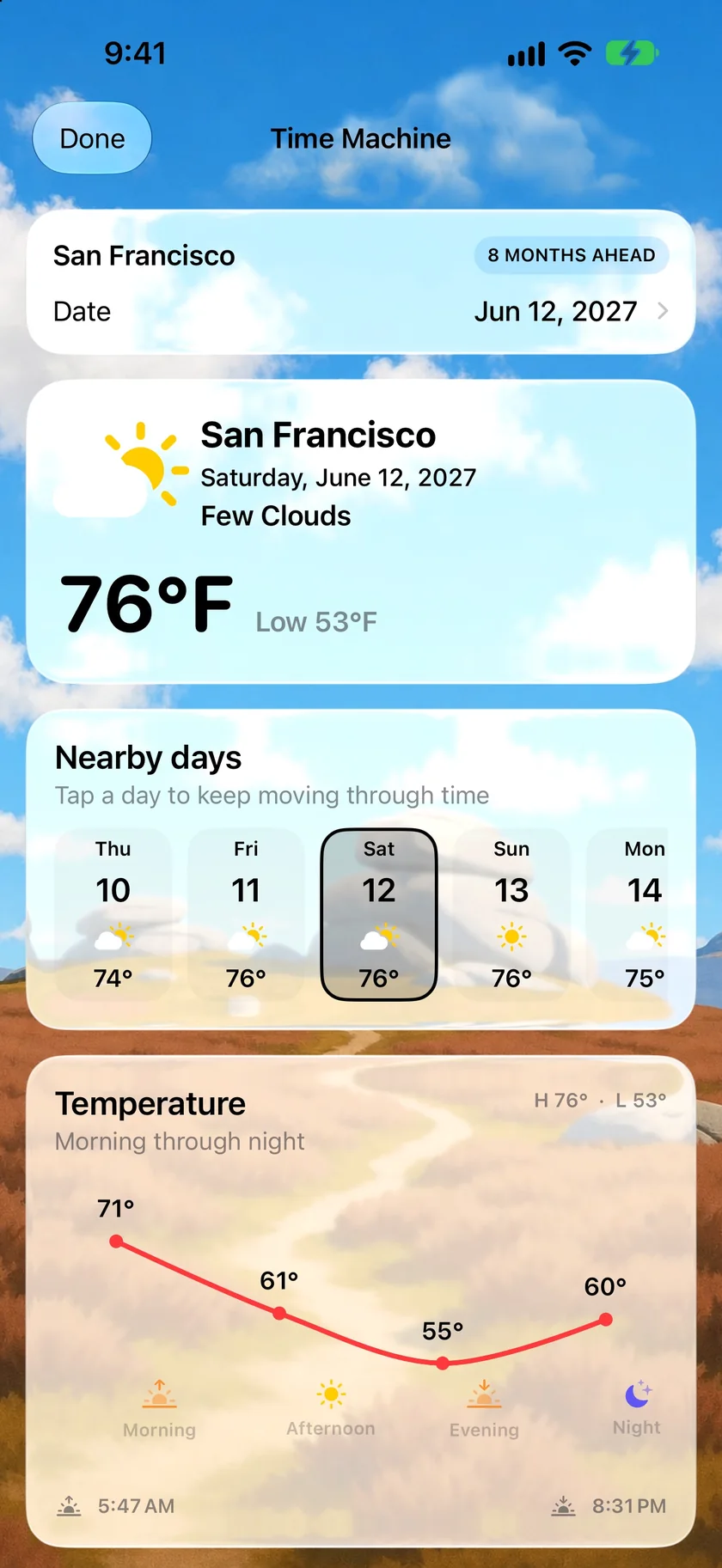
Months away? Get a feel for the date.
The card picks up a trip once a daily forecast can reach it. Before that, Time Machine opens any date up to about 18 months ahead and shows a planning outlook for the place you're looking at, with the days around it. Treat it as a sense of the season rather than a forecast. The app does too: past 60 days, it calls this a long-range planning outlook, not a promise.
- Any date up to about 18 months out
- High, low, conditions and the days either side
- Morning-to-night temperatures, with sunrise and sunset
- Within 14 days the app calls it a near-term forecast
- Time Machine is Gold on iPhone, iPad and Apple TV, and Pro on the Mac
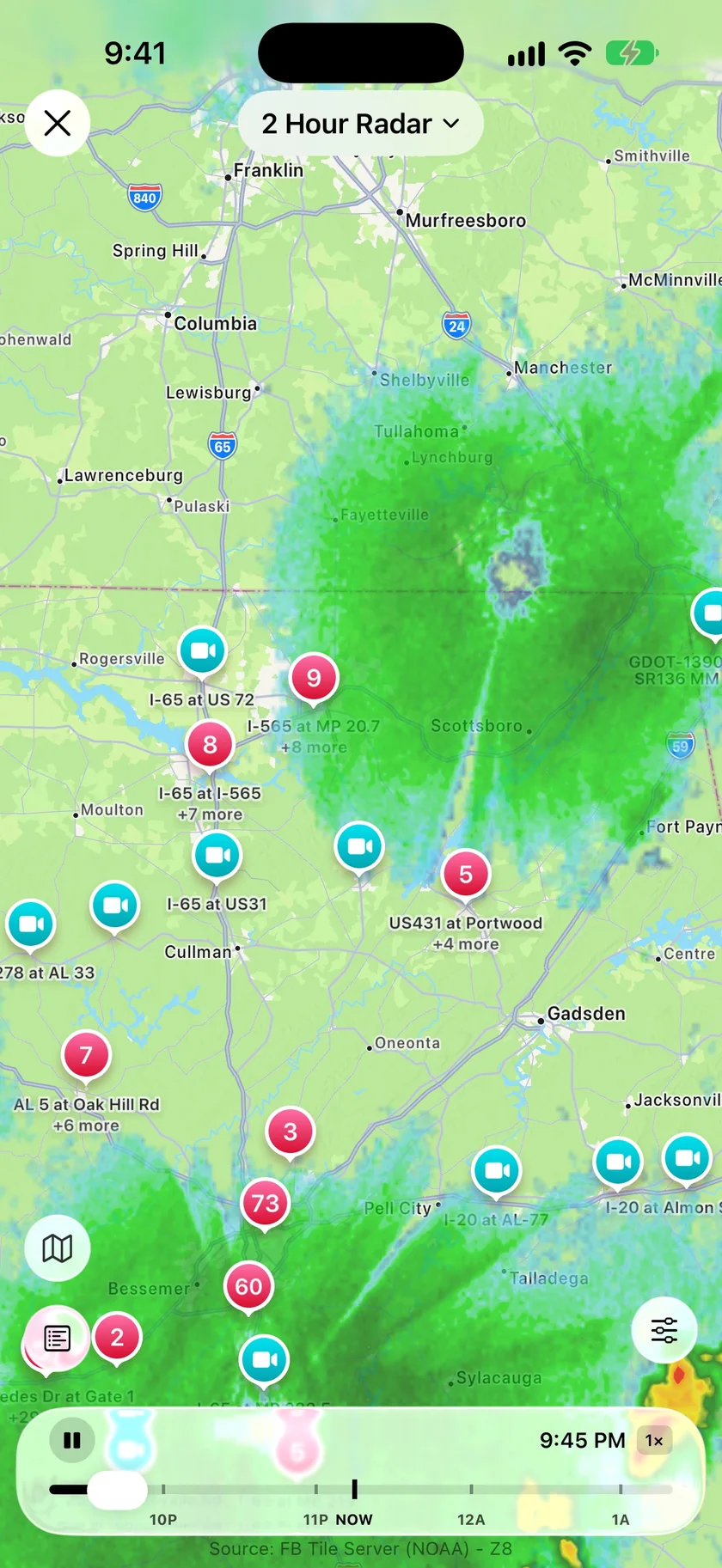
The drive, and the story of the day.
As you get close, two other parts of the app help. The Travel View on the radar turns on traffic incidents, work zones, road conditions and cameras in one tap, over whatever map layer you're on. And in Smart Weather Stories, the Travel Briefing template steers your forecast story toward how you're travelling and the hours that matter.
- Road layers depend on what each US state reports
- Travel Briefing is a Quick Template under My Custom Briefing, and you can edit it
- It asks for flight or driving conditions and backup plans if the weather interferes
- It only mentions trips on your calendar if Calendar Integration is on
- Both need Gold on iPhone and iPad, and Pro on the Mac
An honest note: what the card leaves out, and where your calendar goes.
The card shows one day, the first of the trip still ahead of you, and tapping the trip opens the hourly and daily tables for the rest. It works from addresses, so an event with no location never appears, and text it can't confidently place, like a meeting room called Denali, is left out rather than guessed at. A trip you add stays hidden while you're within about 50 km of it, since the main forecast already has you covered there.
The calendar is optional. When you use it, Forecast Bar reads it on your device: the calendars you select, for the days in your Look Ahead. It doesn't use event titles. To place an event it sends the location text to Apple's geocoder, and the forecast request for that place goes to The Weather Company. Calendar trips aren't saved to your account. Trips you add by hand sync through your Forecast Bar account when you're signed in.
Travel Briefing is a separate choice. If you turn on Calendar Integration in Smart Weather Stories, your event details are included in the request that writes your story.
Questions about trip weather
How does Forecast Bar find trips on my calendar?
Can I use Upcoming Travel without giving it my calendar?
Can I follow the weather for someone else's trip?
Can I compare a trip with the weather at home?
How far ahead can I see the weather for a trip?
Does Upcoming Travel work on the Mac?
How much does Forecast Bar cost?

See the weather where you're headed.
Try Upcoming Travel free for 7 days with a new Gold subscription on iPhone or iPad.
Free to download; live weather requires a subscription. On iPhone and iPad, every subscription includes a 7-day free trial for new subscribers; Mac plans do not. Mac and iOS plans are separate; Apple TV is included with Forecast Bar Gold on iOS.
More from Forecast Bar
Road conditions & traffic cameras
Traffic cameras, reported road conditions, incidents and work zones on the radar map.
Historical weather & Time Machine
The weather on any date back to 1979, and a planning outlook about 18 months ahead.
Multiple locations & side-by-side compare
Unlimited saved places, all visible at a glance, and any two comparable side by side.