Forecast Bar forecasts how colorful each sunrise and sunset will be — a color-potential score from 0 to 10 based on the atmospheric ingredients that make skies light up. Gold subscribers can view the full forecast and get notified before the beautiful ones.
Viewing the quality forecast
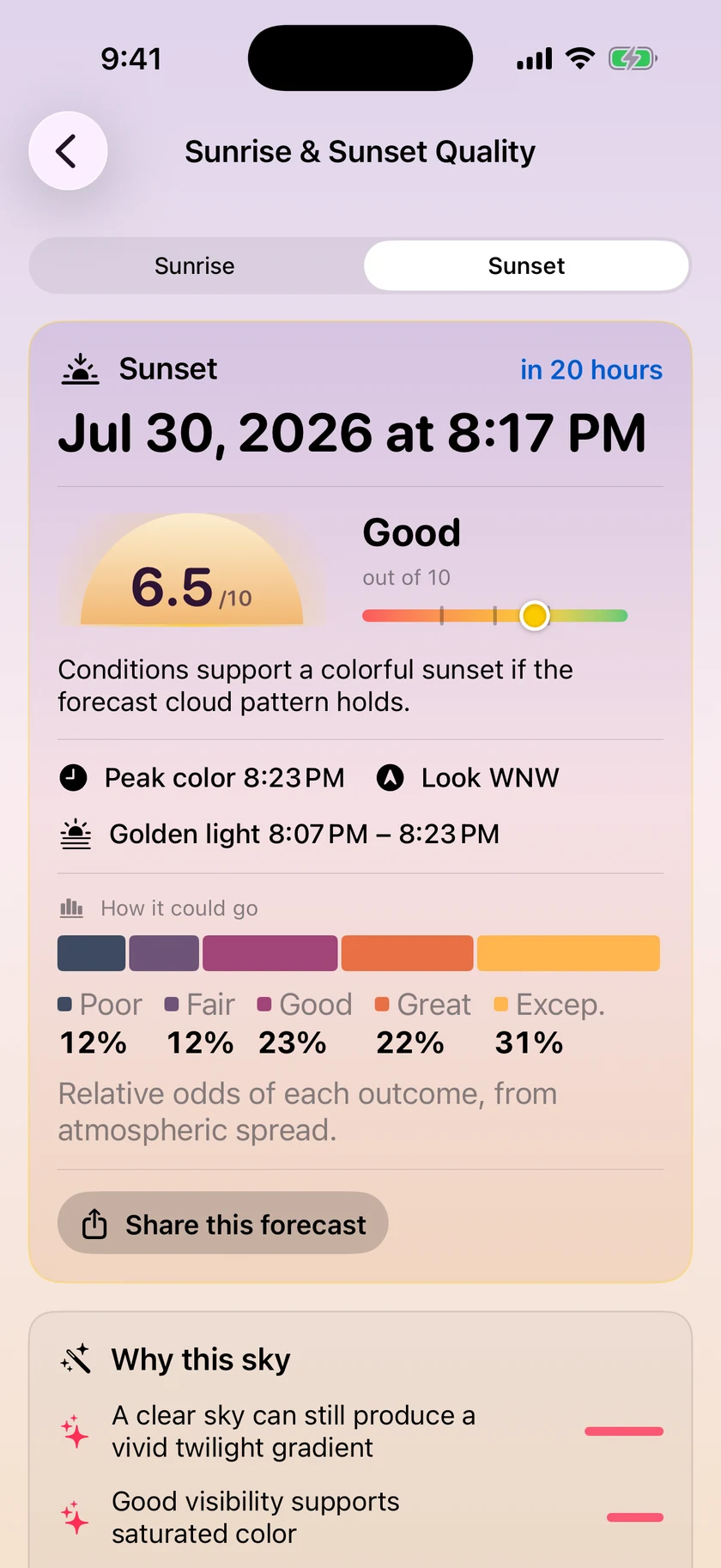
Open the sun details from the main screen: tap any data point tile to open the data point screen, choose Sunrise or Sunset, then tap the quality summary row. The forecast page shows:
- The score — 0 to 10 color potential for the chosen sunrise or sunset.
- Weather ingredients — the conditions feeding the score, like cloud layers and moisture.
- Outcome odds — a bar showing how likely each kind of result is, from a gray fizzle to a full-sky show.
- Viewing plan — when and where to look.
See Data Points for more on the data point screen itself.
Beautiful Sunrise & Sunset alerts
Two ready-made notifications — Beautiful Sunrises and Beautiful Sunsets — live under Settings → Notifications → Custom Notifications. Turn either on and Forecast Bar will notify you when the forecast score reaches your threshold:
| Setting | Default | Options |
|---|---|---|
| Quality threshold | 5 or higher | 0–10, in 0.5 steps |
| Timing | 1 hour before sunrise/sunset | Relative: 3h, 2h, 1h 30m, 1h, 45m, 30m, or 15m before; at sunrise/sunset; 15m, 30m, 45m, 1h, or 1h 30m after — or switch to a fixed delivery time |
Tapping the notification opens the full quality forecast page. These alerts follow the same requirements as all Forecast Bar notifications — see Alerts & Notifications Overview — and can be edited like any other custom notification (Custom & Threshold Alerts).
Live Sunset Alerts
Beautiful Sunset alerts work from the forecast; Live Sunset Alerts add a second check from orbit. Minutes before sunset, Forecast Bar compares the forecast against live satellite imagery and only alerts you when the sky is actually shaping up — a rare heads-up that tonight is worth stepping outside for. US locations only.
Turn on the switch in its own Live Sunset Alerts section under Settings → Notifications (it's off by default). With it on, an Alert frequency control chooses how often you hear about it:
| Option | What you get |
|---|---|
| Worth it | Only when live satellite confirms a promising sunset — around 1–2 alerts a month. This is the default. |
| More | Satellite-confirmed with a lower bar — around 5 alerts a month. |
| Daily | One notification every evening with tonight's rating. |
Live Sunset Alerts follow the same requirements as the app's other notifications — subscription, sign-in, and notification permission — see Alerts & Notifications Overview.
Sharing the forecast
On the quality forecast page, tap Share this forecast to render a shareable card with the score and details — handy for rallying friends to a viewpoint before a promising evening.
Tell us what you saw
After the event, the forecast page invites feedback: Tell us what you saw. Rate how the sky actually turned out, add comments, and optionally attach a photo of the real sky. Your reports help improve the quality forecasts for everyone.
