The full-screen radar plays an animated loop of precipitation over a map you can pan and zoom freely — with satellite, temperature, wind, and specialty layers, and a set of overlays you can draw on top: live warnings, lightning strikes, storm cells, and road conditions and cameras.
Radar requires at least a Silver subscription; the extended durations and advanced layers below need Gold. See Plans & Subscriptions.
Opening the radar
- Tap the radar button in the main screen toolbar (top right). Without a subscription this button opens the upgrade screen instead.
- On the main screen's precipitation section, select the Radar tab and tap the mini map to expand it full screen (the mini radar map itself is a Gold feature — see The Main Screen).
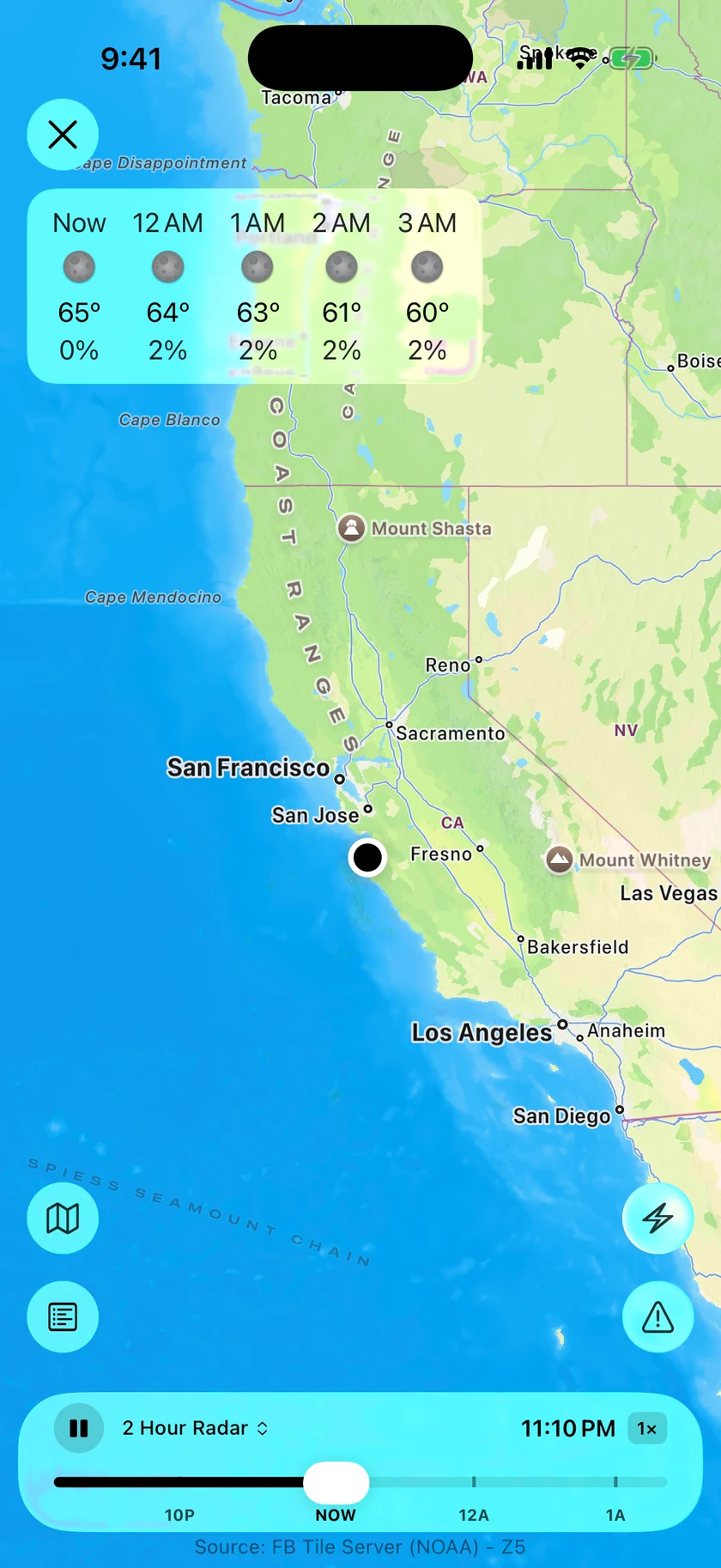
Close the radar with the ✕ button in the top corner.
Playback
The bar along the bottom controls the animation:
- Play / Pause — starts and stops the loop. If frames fail to load, this becomes a Retry button.
- Timeline — a scrubber with hour tick marks and a NOW marker separating past from forecast. Drag anywhere on it to jump to a moment in the loop.
- Time & speed button — shows the current frame's time plus the playback speed. Tap it to cycle the speed:
0.5×→1×→1.5×→2×.
The map itself supports pinch to zoom and drag to pan. After you pan away, a recenter button appears to snap back to your location.
Layers
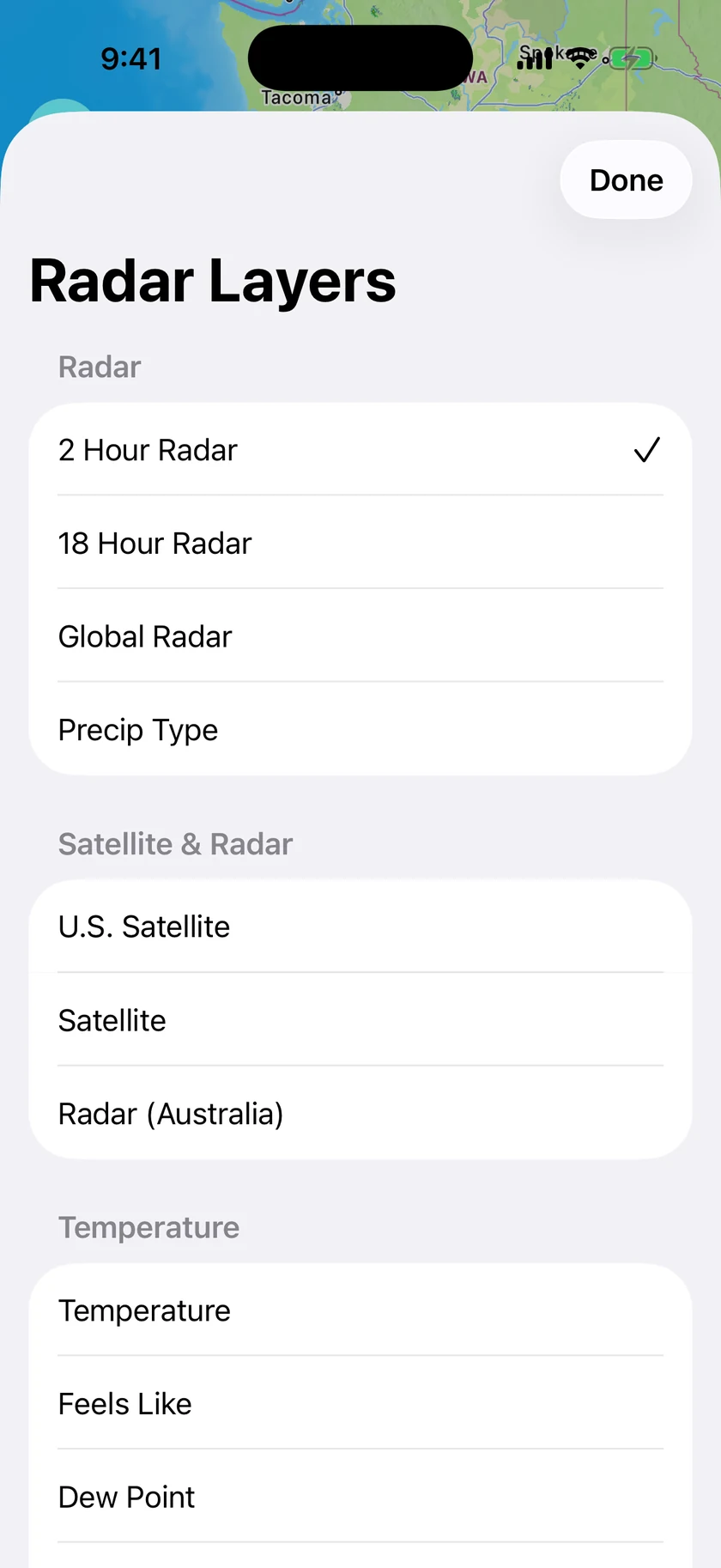
Tap the layer name button in the bottom bar to open the layer picker. Locked layers show a lock icon; tapping one shows an "Upgrade to Gold to Unlock" alert.
Radar
| Layer | What it shows | Requires |
|---|---|---|
| 2 Hour Radar (default) | Recent radar plus the near-term forecast loop | Silver — included with any subscription |
| 18 Hour Radar | An extended loop reaching much further into the forecast | Gold |
| Global Radar | Satellite-derived precipitation with worldwide coverage — useful outside traditional radar networks. The loop continues past NOW with forecast frames, so you can scrub ahead anywhere on Earth | Silver |
| Precip Type | Colors precipitation by type — rain, snow, and mixes | Gold |
Advanced layers
All of the following require Gold. The list you see varies by region — Forecast Bar only offers the layers with data for the area you're viewing.
| Section | Layers |
|---|---|
| Specialty | Aurora Forecast, Road Weather Index |
| Satellite | U.S. Satellite, Satellite, Radar (Europe), Radar (Australia), IR Satellite (Europe), Visible Satellite (Europe) |
| Temperature | Temperature, Feels Like, Dew Point, Temperature Change |
| Precipitation | Precipitation 24 Hour, Snow 24 Hour |
| Wind | Wind Speed, UltraViolet (UV) |
Tip: Set which layer the radar opens with under Settings → Data & Layout → Radar → Default Layer.
Map controls
- Map style (bottom left) — tap to pick
Standard,Satellite, orHybridfor the base map. - Legend (bottom left) — shows the color scale for the current layer, so you can read intensity at a glance.
- Overlays (the slider icon, bottom right) — everything you can draw on top of the weather map. See below.
The warnings list
With Weather Warnings on, a counter shows how many warnings are active in view. Tap it to open the list — each warning expands into full details, including the official instructions and the affected areas.
Overlays
The Layers picker chooses the weather map itself; the Overlays button chooses what is drawn over it. Each overlay is an independent switch, so you can run warnings and lightning together, or road conditions on their own, in any combination.
Weather
| Overlay | What it draws | Requires |
|---|---|---|
| Weather Warnings | Active warning areas as colored polygons, including tornado, severe thunderstorm and flood warnings | Silver |
| Lightning | Recent lightning strikes | Silver |
| Storm Cells | Storm tracks and severe-weather probabilities | Gold |
| Local Storm Reports | Reported hail, tornadoes, wind damage, snow and flooding, with report times and sources | Gold |
Weather on Roads
Road information comes from transportation agencies, so what you see depends on where you are and on which agency reports it. Coverage varies by location, and the app says so on the sheet itself.
| Overlay | What it draws | Requires |
|---|---|---|
| Snow, Ice & Road Conditions | Road conditions as the transportation agency reports them | Gold |
| Weather Road Alerts | Agency-reported weather hazards on the road, including snow, ice and flooding | Gold |
| Road & Air Temperatures | Measured road-surface and air temperatures, drawn inside compact pins that group together as you zoom out | Gold |
| Road Cameras | Cameras along the road, as live video or periodic snapshots | Gold |
Read these as reports, not as guarantees. A temperature on its own doesn't confirm ice, and a road with no report isn't necessarily clear — it may simply be a road nobody is reporting on.
Flooding & Fire
| Overlay | What it draws | Requires |
|---|---|---|
| River Gauges | River levels and reported flood stages | Gold |
| Fire Perimeters | Reported fire boundaries. These are the fire's own edges and not evacuation areas — follow your local emergency services for those | Gold |
Weather Outlooks
These appear only where the outlook covers the area you're looking at (the contiguous US).
| Overlay | What it draws | Requires |
|---|---|---|
| Severe Storm Risk | The SPC convective outlook | Gold |
| Excessive Rainfall | The WPC flash-flood outlook | Gold |
Tropical
Hurricane and tropical storm tracking, from the National Hurricane Center. Both overlays cover the Atlantic, East Pacific and Central Pacific, and both can be switched on before a storm forms.
| Overlay | What it draws | Requires |
|---|---|---|
| Active Storms | Each live storm's forecast cone, past track and forecast points, with the coastal watches and warnings in effect. Tap a storm for its winds, pressure, movement and forecast | Gold |
| Tropical Outlook | The 7-day areas where a storm may still form, each with its odds | Gold |
The switch subtitle says what the storm list currently holds, so No active storms right now means the data loaded and the basins are quiet — not that the overlay failed. See Hurricane Cone Alerts to be notified when a cone reaches you.
Optional Traffic Information
These four are traffic rather than weather, and they're separate switches so that turning road weather on doesn't fill the map with roadworks.
- Road Closures — closures outside reported work zones; the cause varies.
- Traffic Incidents — crashes and other disruptions.
- Work Zones — construction and work-zone closures.
- Message Signs — agency message boards, including traffic notices.
Road cameras
Tap a camera pin and its view opens in a card over the map, with the close button at the top right. The card stays above the radar rather than being covered by it, and camera labels and controls sit off the image so they don't hide what you're trying to see.
Where cameras cluster, the card plays several nearby views at once in a grid and keeps the one you picked in the middle, so you can scan a stretch of road without closing and reopening cards.
Tap a view to expand it full screen — in landscape on iPhone — with Fill and Fit to choose between filling the screen and seeing the whole frame. Tap the picture once to hide the title and controls, and again to bring them back.
Not every agency provides live video; some send still images that refresh on the agency's own schedule, and a camera that's offline says so rather than showing a stale frame.
Weather overlay
A strip of upcoming hourly temperatures floats at the top of the radar. Turn it off with Settings → Data & Layout → Radar → Show Weather Overlay.
Next-Generation Radar
Settings → Data & Layout → Radar → Next-Generation Radar — on by default. Uses high-resolution, smoothly interpolated radar when available: it keeps a complete colored fallback visible, shows the latest frame first, and fills in the rest of the loop in the background. Turn it off if you prefer the classic tiles.
Custom Radar
Prefer a specific radar website? Turn on Settings → Data & Layout → Radar → Use Custom Radar and enter its URL. The main screen's radar button will then open your page instead of the built-in radar. Use {lat} and {lng} in the URL as placeholders for your current location — Forecast Bar fills them in when it opens the page.
Note: Gold subscribers can also put radar on the Home Screen with the radar widget — see Home Screen Widgets.
