Forecast Bar offers seven Lock Screen widgets, so you can check the weather without even unlocking your phone. Like the Home Screen widgets, they require a Silver or Gold subscription — see Plans & Subscriptions. Without one, a placed widget shows a short upgrade message instead of weather.
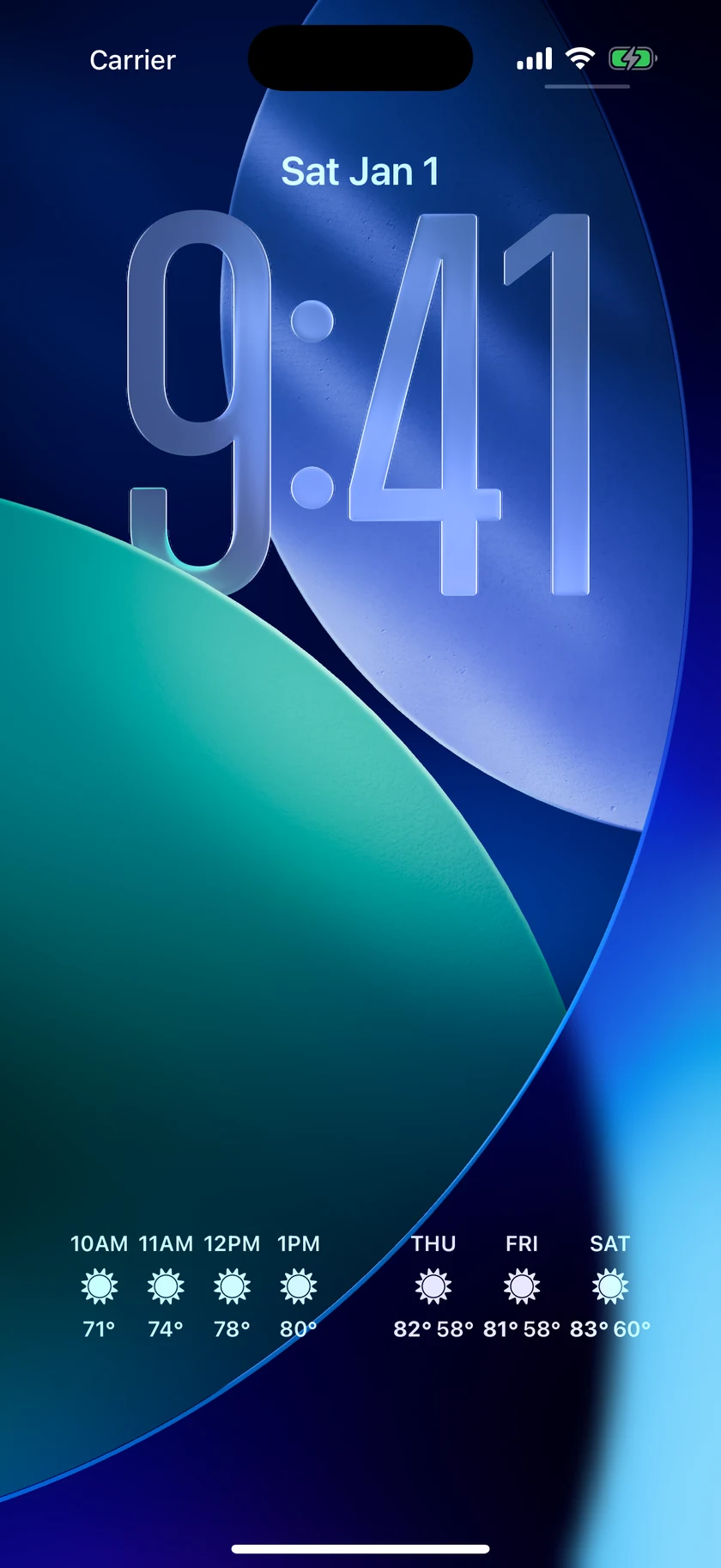
Adding a Lock Screen widget
- Long-press the Lock Screen, then tap Customize.
- Choose the Lock Screen preview.
- Tap the widget area below the clock (or the strip above it for inline widgets).
- Select Forecast Bar and tap or drag the widgets you want.
- Tap a placed widget to change its options, then tap Done and confirm.
Widgets come in three shapes: rectangular (the wide slots below the clock), circular (the small round slots), and inline (the single text line above the clock, next to the date).
Tip: These same widgets appear larger and glanceable in StandBy — charge your iPhone on its side and add a Forecast Bar widget to the StandBy widget stack for a bedside or desk weather display.
Smart Weather Widget
Shape: rectangular
The Lock Screen version of the app's flagship widget. It adapts to the time of day and to precipitation: your temperature and conditions, a precipitation chart when rain or snow is near, upcoming hours during the day, and upcoming days in the evening — plus an optional extra data point of your choice.
| Option | Default | Choices |
|---|---|---|
| Location | Current Location | Current Location or any saved location |
| Use Feels Like | Off | On / Off |
| Show Precip Chart | On | On / Off |
| Show Precip Chance | On | On / Off |
| Show Data Point | Off | On / Off |
| Data Point to Show | High/Low | AQI, Cloud Cover, Dew Point, Feels Like, High/Low, Humidity, Location, Pollen Count, Tides, Precip Chance, Pressure, UV Index, Visibility, Wind Speed |
| Show Data Point Below Hourly | Off | On / Off |
| Show Daily Forecast | On | On / Off |
| Show Daily At Hour | 8:00pm | Always, or any hour from 5:00am to 11:00pm |
| Number of Days Shown | 1 Day, 2 Hours | 1 Day, 2 Hours · 2 Days, 1 Hour · 3 Days, 0 Hours |
| Day or Date | Day (Fri) | Day (Fri) / Date (8/28) |
Data Point to Show and Show Data Point Below Hourly appear only while Show Data Point is on. Number of Days Shown controls the evening mix of day and hour columns.
Smart Widget
Shapes: rectangular and circular
A second smart widget that also comes in the small circular shape. It shows the current weather plus the next 4 hours, the next 3 days, or precipitation — whichever matters most right now. Its options are identical to the Smart Weather Widget above.
3 Day Forecast
Shape: rectangular
The next few days at a glance: an icon, high, and low for each day.
| Option | Default | Choices |
|---|---|---|
| Location | Current Location | Current Location or any saved location |
| Day Or Date | Day (Fri) | Day (Fri) / Date (8/28) |
| Show Current Day | On | On / Off |
| Use as Secondary (Future Days) | Off | On / Off |
| Use Feels Like | Off | On / Off |
| Show Precip Chance | On | On / Off |
Show Current Day includes today as the first column; turn it off to start with tomorrow. Use as Secondary (Future Days) makes the widget show the following three days instead of the first three — place two 3 Day widgets side by side and you get a six-day forecast on your Lock Screen.
Data Point
Shape: circular
One number in a small circle — pick any single data point.
| Option | Default | Choices |
|---|---|---|
| Location | Current Location | Current Location or any saved location |
| Data Point | Humidity | AQI, Cloud Cover, Dew Point, Feels Like, Heat Index, Humidity, Precip Chance, Pollen Count, Tides, Pressure, Temperature, UV Index, Visibility, Wind Chill, Wind Speed |
Data Point (inline)
Shape: inline
Lives in the thin line above the clock, sharing the row with the date. It shows one data point — or two, if you turn on More Info.
| Option | Default | Choices |
|---|---|---|
| Location | Current Location | Current Location or any saved location |
| Data Point 1 | Humidity | same 15-item list as the circular Data Point widget |
| Data Point 1 - More Info | Off | On / Off |
| Data Point 2 | UV Index | same list — appears only when More Info is on |
Temperature
Shape: circular
A gauge with the current temperature positioned between today's low and high, so you can see at a glance where the day is heading.
| Option | Default | Choices |
|---|---|---|
| Location | Current Location | Current Location or any saved location |
| Use Feels Like | Off | On / Off |
Sunrise & Sunset
Shapes: circular, rectangular and inline
New in 11.7. It answers one question — how much of the day is left? — in whichever shape you have room for.
| Shape | What it shows |
|---|---|
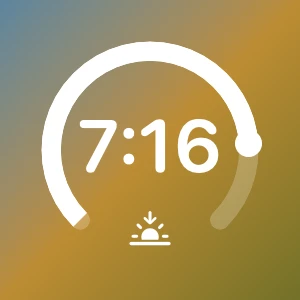
| Circular | A thick ring that fills toward the next event, daylight while the sun is up and the night while it is down, with the sun riding the fill as a puck. The next event's time sits large in the middle, with no AM/PM: the small glyph in the ring's opening already tells you whether you are waiting for a sunrise or a sunset. After dark the fill dims and the glyph turns to sunrise. |
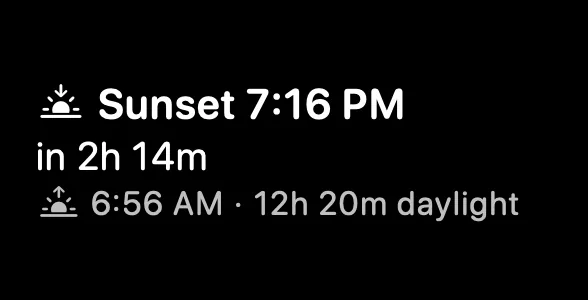
| Rectangular | Sunset 7:16 PM on the first line, the countdown (in 2h 14m) on the second, and on the third the other end of the day with its own glyph, then the length of daylight. |
| Inline | One line above the clock: Sunrise 6:42 AM · in 2h 14m. |
| Option | Default | Choices |
|---|---|---|
| Location | Current Location | Current Location or any saved location |
Times are drawn in the location's own time zone, so a saved city several zones away reads correctly. The countdown says now within half a minute of the event and drops the hours under an hour (in 43m).
Note: this widget is iPhone and iPad only. The Mac has no Lock Screen widgets, and the watch's own Sun & Moon screen covers the same ground on the wrist.
Note: Prefer minute-by-minute rain tracking on the Lock Screen? That's the Rain & Snow Live Activity, which appears automatically when precipitation is close.
