Forecast Bar includes nine Home Screen widgets, from a single glanceable temperature to a live radar map. Widgets require a Silver or Gold subscription (the Radar widget requires Gold) — see Plans & Subscriptions. Without a subscription, a placed widget shows an upgrade message ("Upgrade to Silver or Gold level to enjoy widgets") instead of weather.
Looking for your watch face instead? See Apple Watch complications. For the Lock Screen, see Lock Screen Widgets.
Adding and configuring a widget
- Long-press an empty area of the Home Screen until the apps jiggle.
- Tap + in the top corner (on newer iOS versions, Edit → Add Widget).
- Search for or select Forecast Bar.
- Swipe to the widget you want, pick a size, and tap Add Widget.
- To change its options, long-press the placed widget and choose Edit Widget.
Tip: If a widget says "Set up location — Tap to choose a location," long-press it → Edit Widget and pick a location. If it says "Weather unavailable," open Forecast Bar once to refresh the data.
Options every widget shares
Most widgets share these three options (the Radar widget draws a map instead, so it has its own look-and-feel options):
- Location —
Current Locationor any location you've saved in the app. Each widget can point at a different location. - Background Style — one of 8 styles:
App Backgrounds,App Backgrounds (Blur),App Icon Theme,Weather Matched,AMOLED Black,System Theme (B&W),App Backgrounds (Bordered),App Backgrounds (Blur/Bordered). - Overlay Opacity — how strong the dimming overlay behind the widget's content is, from
30%to85%in 5% steps. Default 65%. Lower it for a more vivid background; raise it for more text contrast.
Severe weather badges
When a warning is in force for a widget's location, the medium and large sizes of the Smart Weather Widget and the Current Weather widget show a badge in the warning's severity color, with the alert name and how long it runs. Tap the badge (iOS 17 and later) and the widget flips to the list of active warnings, with a tap through to the full alert in the app; the close chevron flips it back. The badge disappears on its own the moment the warning expires. Watches and advisories don't badge — only warnings do — and the Lock Screen Smart Weather Widget carries the same badge.
How often widgets refresh
Widgets update themselves roughly every 45–75 minutes — Gold subscribers refresh on the faster end, Silver on the slower end, and the Data Point widget updates a bit more often than the rest. The Radar widget pulls fresh radar imagery every 15 minutes. iOS controls the exact timing, so updates can occasionally take a little longer. Opening the app always fetches fresh weather immediately.
Smart Weather Widget
Sizes: Small, Medium
The flagship widget. It adapts to the time of day and to precipitation, so it always shows the most relevant data: current conditions and temperature with today's high/low, a minute-by-minute precipitation chart when rain or snow is coming, the next hours of forecast, and — later in the evening — upcoming days instead of hours.
| Option | Default | Choices |
|---|---|---|
| Location | Current Location | Current Location or any saved location |
| Background Style | App Backgrounds | 8 styles (see above) |
| Show Precip Chart | On | On / Off |
| Use Feels Like Temperature | Off | On / Off |
| Current Data Point | Feels Like | AQI, Cloud Cover, Dew Point, Feels Like, Heat Index, Humidity, Precip Chance, Pollen Count, Tides, Pressure, UV Index, Visibility, Wind Chill, Wind Speed, None |
| Hourly Data Point | Precip Chance | Cloud Cover, Dew Point, Feels Like, Heat Index, Humidity, Precip Chance, Pressure, UV Index, Visibility, Wind Chill, Wind Speed |
| Show Daily Forecast | On | On / Off |
| Switch from Hourly to Daily At | 8:00pm | Always, or any hour from 5:00am to 11:00pm |
| Number of Days Shown | 2 Days | 1–5 Days |
| Hours Shown | 6 Hours | 6 Hours / 8 Hours |
| Hourly Interval | Every Hour | Every Hour / Every Other Hour |
| Bottom Row Style | Timeline | Timeline / Temp Curve |
| Date Format | Day (Fri) | Day (Fri) / Date (8/28) |
| Overlay Opacity | 65% | 30–85% |
| Interactive | On | On / Off |
Interactive puts a small tap button on the widget that flips it to a second page of extra data points — Cloud Cover, Dew Point, Feels Like, Heat Index, Humidity, Precip Chance, Pressure, UV Index, Visibility, Wind Chill, and Wind Speed — without opening the app. Tap again to flip back.
The daily-forecast options (Switch from Hourly to Daily At, Number of Days Shown, Date Format) appear only while Show Daily Forecast is on.
Current Weather
Sizes: Small, Medium, Large, Extra Large
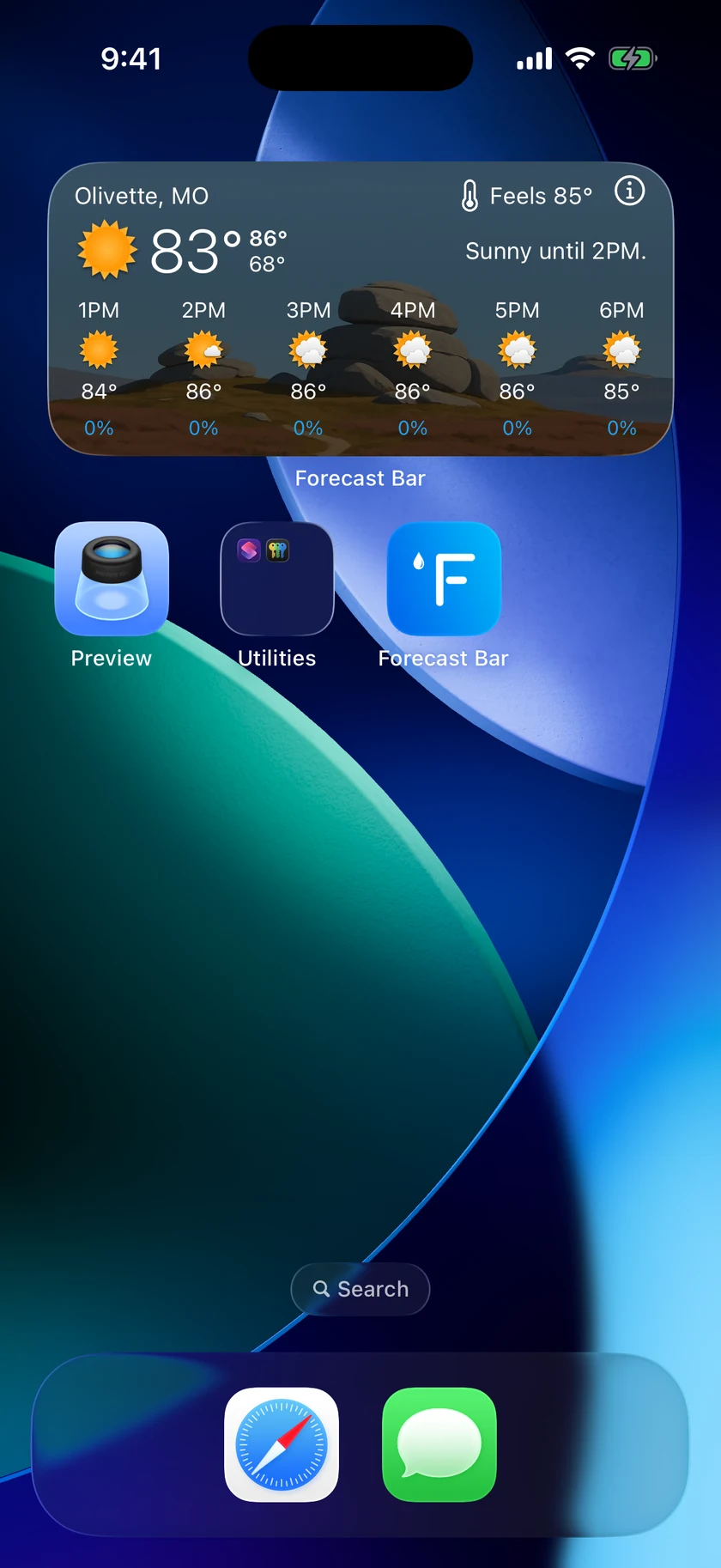
The classic at-a-glance widget: current temperature, conditions icon, and summary for one location, with today's high and low. Larger sizes add the hourly and daily forecast, and a precipitation graph appears when rain or snow is expected.
| Option | Default | Choices |
|---|---|---|
| Location | Current Location | Current Location or any saved location |
| Background Style | App Backgrounds | 8 styles |
| Use Feels Like | Off | On / Off |
| Hourly Row | Precip Chance | None, Temperature, Feels Like, Precip Chance, Humidity, Dew Point, Wind Speed, UV Index, Cloud Cover, Pressure, Visibility, Heat Index, Wind Chill |
| Date Style (Large size only) | Thursday | THU, Thursday, 10/15, 15/10, "Thu, Oct 15", "Thu, 15 Oct" |
| Don't Show Precip Graph | Off | On / Off — turn On to hide the precipitation graph |
| Extra Large Layout (iPad) | More Hours (24 hours, 6 days) | More Hours (24 hours, 6 days) / More Days (12 hours, 10 days) |
| Show Current Data Points | On | On / Off — the three-tile row on the tall Extra Large size |
| Current Data Point 1 / 2 / 3 | Humidity, UV Index, Wind Speed | Any data point |
| Daily Rows (Extra Large) | Summary | Summary / Compact — the tall Extra Large size's daily list |
| Overlay Opacity | 65% | 30–85% |
Hourly Row sets which value appears under each hour in the hourly forecast on the Medium and Large sizes. It stays on Precip Chance unless you change it, so widgets you added before this option existed look the same as they always did.
The Extra Large size
Extra Large comes in two shapes, and which one you get is decided by the device and the slot you drop the widget into.
The wide shape — on iPad and on the Mac — is twice the Large widget's width at the same height. The current conditions span the top, and Extra Large Layout (iPad) decides what fills the rest: More Hours gives you 24 hours over two rows with six days in two columns, and More Days gives you 12 hours with up to ten days.
The tall shape, new on iOS 27, is the Large widget's width at about twice its height, and it follows the app's own main screen: current conditions, then a row of three data points you choose, then the hourly row with its rain bars, then the days ahead. Two options belong to this shape only:
- Show Current Data Points puts the three-tile row in, and Current Data Point 1, 2 and 3 choose what they read. Turn the row off and the space goes to the forecast — one more day.
- Daily Rows (Extra Large) picks how each day is drawn. Summary is the fuller row with the day's sentence; Compact is a single line — the day, its conditions icon, and a bar showing where that day's temperature range sits against the rest of the week.
Between them, those two controls set how many days fit: Summary shows six days, or seven with the data points off; Compact shows nine, or ten with the data points off.
From 11.7 the top block also carries today's written forecast, so today reads like the days below it rather than being the one day with only an hour's sentence. The nowcast stays on the line above it while rain or snow is falling or due within the hour; the rest of the time the write-up shows on its own. The card grows a little when both appear, and the days below share what is left — the day counts are unchanged.
Multi-City
Sizes: Small, Medium
Weather for several places at once — the Small size shows 2 locations, the Medium shows 4. By default it uses the first locations in your saved list (rearrange them in the app), but you can override each slot.
| Option | Default | Choices |
|---|---|---|
| Background Style | Weather Matched | 8 styles |
| Location 1 / 2 / 3 / 4 | Your first four saved locations, in order | Current Location or any saved location |
| Overlay Opacity | 65% | 30–85% |
If you haven't saved at least two locations yet, the widget asks you to add locations and tapping it takes you straight to the app's location search.
4 or 5 Day Forecast
Sizes: Small, Medium
The days ahead: an icon, high, and low for each of the next five days, plus current conditions. Because it shows daily data that changes slowly, this widget refreshes less often than the others.
| Option | Default | Choices |
|---|---|---|
| Location | Current Location | Current Location or any saved location |
| Background Style | App Backgrounds | 8 styles |
| Day Or Date | Day (Fri) | Day (Fri) / Date (8/28) |
| Use Feels Like | Off | On / Off |
| Overlay Opacity | 65% | 30–85% |
Hourly Graph
Sizes: Small, Medium
An hourly temperature curve with up to two rows of extra data under it. The Small size shows four hours and just the first data row; the Medium shows more hours and both rows.
| Option | Default | Choices |
|---|---|---|
| Location | Current Location | Current Location or any saved location |
| Data Point 1 (top row) | Precip Chance | None, Temperature, Feels Like, Precip Chance, Humidity, Dew Point, Wind Speed, UV Index, Cloud Cover, Pressure, Visibility, Heat Index, Wind Chill |
| Data Point 2 (bottom row) | Feels Like | same list |
| Interval | Every Other Hour | Every Hour / Every Other Hour |
| Background Style | App Backgrounds | 8 styles |
| Overlay Opacity | 65% | 30–85% |
| Black Text | Off | On / Off |
Hourly & Daily
Size: Medium only
A split view in the same curve style as Hourly Graph: the hourly forecast on the left half, the daily forecast on the right.
| Option | Default | Choices |
|---|---|---|
| Location | Current Location | Current Location or any saved location |
| Bottom Row | Precip Chance | None, Temperature, Feels Like, Precip Chance, Humidity, Dew Point, Wind Speed, UV Index, Cloud Cover, Pressure, Visibility, Heat Index, Wind Chill |
| Day or Date | Day (Fri) | Day (Fri) / Date (8/28) |
| Background Style | App Backgrounds | 8 styles |
| Overlay Opacity | 65% | 30–85% |
Data Point
Sizes: Small, Medium
Just the numbers: up to four data points of your choice for the current weather, with the conditions icon. This widget refreshes slightly more often than the others (about every 45 minutes on Gold, 60 on Silver).
| Option | Default | Choices |
|---|---|---|
| Location | Current Location | Current Location or any saved location |
| Data Point #1 | Humidity | AQI, Cloud Cover, Dew Point, Feels Like, Heat Index, Humidity, Precip Chance, Pollen Count, Tides, Pressure, Temperature, UV Index, Visibility, Wind Chill, Wind Speed |
| Data Point #2 | Precip Chance | same list |
| Data Point #3 | UV Index | same list |
| Data Point #4 | Wind Speed | same list |
| Background Style | App Backgrounds | 8 styles |
| Overlay Opacity | 65% | 30–85% |
Radar
Sizes: Small, Medium, Large · Requires Gold
Live radar imagery for your location, right on the Home Screen. The imagery refreshes every 15 minutes. Choose from 18 layers — the same layers available in the app's full radar screen.
| Option | Default | Choices |
|---|---|---|
| Location | Current Location | Current Location or any saved location |
| Radar Layer | Radar | Radar, Satellite, Sat+Radar, Aurora Forecast, U.S. Satellite (US Only), Precipitation 24hr, Snow 24hr, Road Weather Index, Temperature, Feels Like, Dew Point, Temperature Change, Wind Speed, UV, Radar (Europe), Radar (Australia), IR Satellite (Europe), Visible Satellite (Europe) |
| Zoom Level | Regional View | Regional View / Local View |
| Map Style | Dark | Dark, Standard, Satellite Imagery |
| Show Map Labels | On | On / Off — appears only when Map Style is Satellite Imagery |
Note: Without a Gold subscription the Radar widget shows an upgrade prompt instead of the map. All other widgets work with Silver or Gold.
Visualize Day
Sizes: Small, Medium, Large, Extra Large (iPad) · Requires Silver or Gold
The scene for this hour — the same realistic sky the app draws on its main screen, with the weather and the light of the actual hour. Tap it to open Visualize Day in the app and watch the whole day unfold.
| Option | Default | Choices |
|---|---|---|
| Show Hourly Forecast | On | On / Off — turn it off for just the current conditions over a clear photo |
The widget follows your current location and refreshes with the rest of them.
