When rain or snow is about to reach your location, Forecast Bar can start a Live Activity — a live, minute-by-minute precipitation tracker that appears on your Lock Screen and in the Dynamic Island without you doing anything. It updates every minute while precipitation is nearby, then disappears on its own when the rain moves out.
The Live Activity requires a Gold subscription (Plans & Subscriptions), notification permission, and iOS 17.2 or later.
Turning it on
Go to Settings → Notifications in Forecast Bar and turn on Live Activity ("Track precipitation on Lock Screen & Dynamic Island") in the Live Activities section. A green checkmark appears briefly once your device is registered.
A few requirements:
- Gold subscription — turning the toggle on without one opens the upgrade screen.
- Notification permission — if you've declined notifications, the app asks you to enable them in the iOS Settings app first.
- Live Activities enabled for Forecast Bar in the iOS Settings app (Settings → Forecast Bar → Live Activities). The app tells you if they're turned off there.
- Minute-by-minute data for your location. It isn't available in every country. Where it's missing, a line under the toggle says the Live Activity won't appear here and that Rain Starting notifications still will.
- iOS 17.2 or later — earlier versions can't start Live Activities automatically.
Tip: Forecast Bar also helps you discover this feature: when rain is in the forecast and the Live Activity isn't set up yet, a Live Activity Available card appears on the main screen with an Enable Live Activities button (or Start Live Activity if it's already enabled, or Open Settings if Live Activities are off at the system level). Tap the X to dismiss the card if you're not interested.
What you'll see
On the Lock Screen
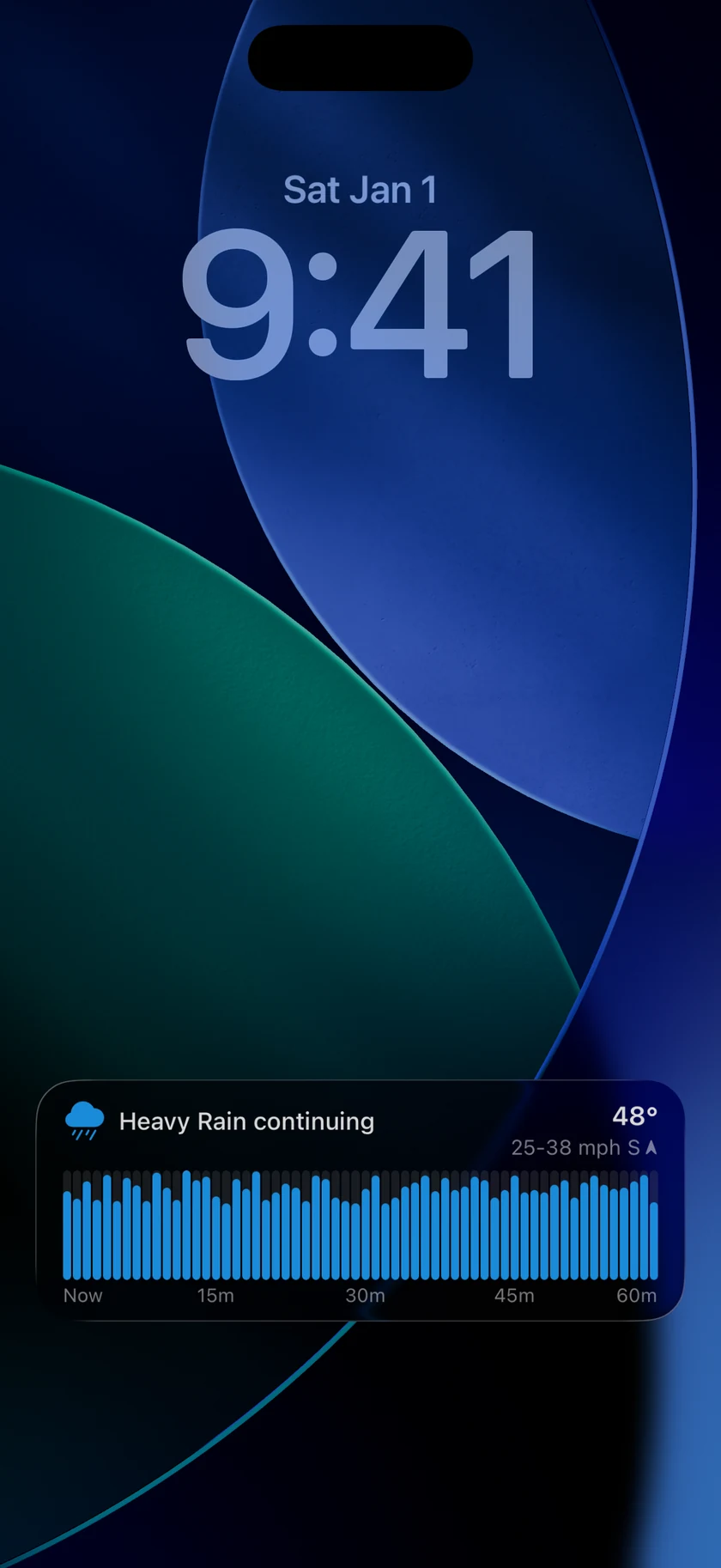
- A precipitation icon and a plain-language summary, such as "Heavy rain ending in 32 min" or "Snow starting in 5 minutes, ending 11 minutes later."
- The current temperature and wind (speed with gusts, direction, and a direction arrow).
- A 60-minute bar chart — one bar per minute, bar height showing intensity, colored by precipitation type (rain, snow, wintry mix, thunderstorm). Time markers run from "Now" to "60m."
Tapping the Live Activity opens Forecast Bar.
Note: If you've customized your precipitation colors in the app, the chart uses your colors — the Live Activity matches the precipitation charts everywhere else in Forecast Bar. See Precipitation Alerts.
In the Dynamic Island
- Compact (the default while another app is open): the precipitation icon and type ("Rain", "Snow", "Mix", "T-Storm") on the left, and short timing on the right — "in 5 min", "32 min left", "Now." When the pill is squeezed, for instance while a phone call shares the island, the type drops out and the icon stands alone rather than wrapping onto two lines.
- Minimal (when another Live Activity shares the island): just the colored precipitation icon.
- Expanded (long-press the island): the icon and temperature, wind with gusts and a direction arrow, the summary line, and the same minute-by-minute chart.
On Apple Watch
On watchOS 11 and later, the Live Activity also appears in the watch's Smart Stack: the precipitation icon, a compact status line like "Light Rain for 60m+," and a mini version of the chart. Nothing to set up — it follows your iPhone automatically.
When it starts and ends
- Starts automatically. Forecast Bar's servers watch the minute-by-minute forecast for your location and start the Live Activity when precipitation is near — even if the app isn't open.
- Updates every minute while precipitation is around.
- Ends on its own when precipitation has passed. If your device loses its connection, the Live Activity dismisses itself once its data is more than about an hour old rather than showing stale information.
- Swiping it away pauses it. If you dismiss a Live Activity from the Lock Screen, Forecast Bar takes the hint and won't start another one for one hour. Opening the app clears that pause immediately.
