The Top Shelf is the wide strip above the app icons on the Apple TV Home Screen. Put Forecast Bar in the top row of the Home Screen and highlight it, and the strip fills with your weather — no need to open the app at all.
What the Top Shelf shows
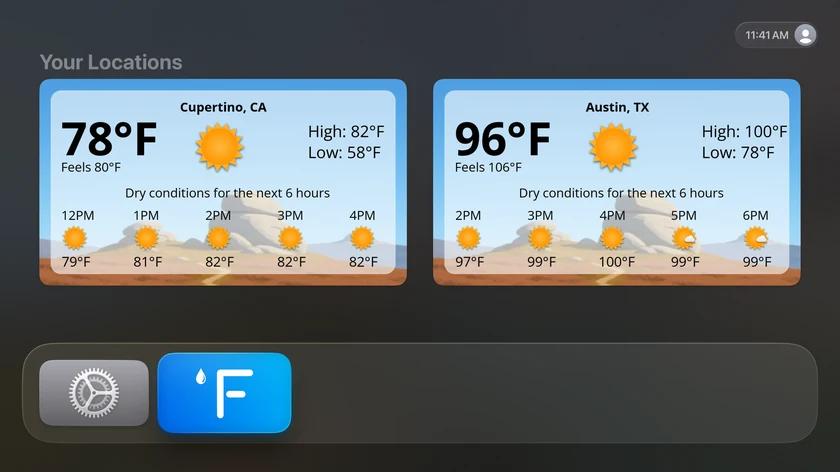
The shelf presents a large card for each of your chosen locations (up to two), under the heading "Your Locations". Each card shows:
- The location name and current condition icon
- The big current temperature, with a labelled secondary temperature — "Feels 70°" (or "Actual 72°" if you use feels-like as your primary temperature)
- Today's high and low
- The current conditions summary line
- The next five hours — time, icon, and temperature for each
Under each card, a caption line shows the data points you've picked, joined together — for example: High: 78° · Low: 61° · Precip: 20% · Wind: 12-18 mph from the SW.
Selecting a card opens Forecast Bar with that location already showing.
Note: The Top Shelf is part of Forecast Bar Gold. If the subscription lapses, the shelf stops showing weather until you resubscribe or restore.
Setting it up
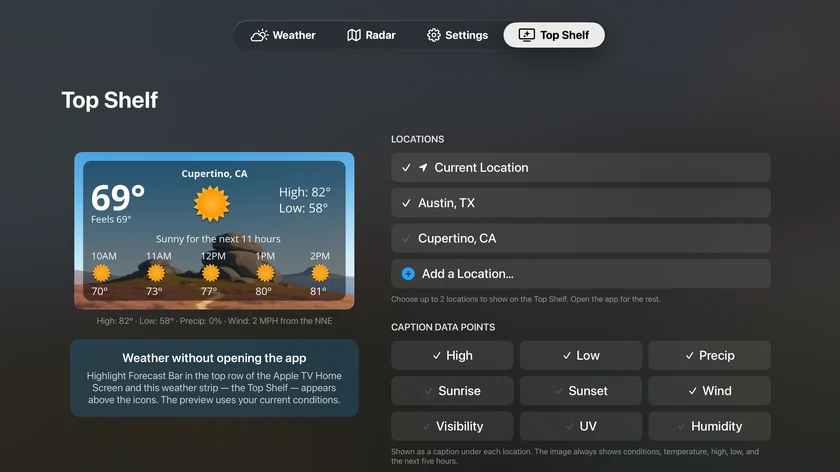
Open the Top Shelf tab in the app (it's also the first tile in Settings, and offered during first-run setup). The screen shows a live preview card on the left — rendered from your current conditions — and the options on the right.
Locations
Choose which locations appear, as checkmark chips: Current Location plus every saved location.
- Up to 2 locations can be selected, and at least one must stay selected.
- Out of the box, the shelf shows Current Location plus your first saved location.
- Add a Location… opens the city search if the place you want isn't saved yet.
Caption Data Points
Choose what appears in the caption under each card, from nine options:
| Data point | Default |
|---|---|
| High | ✓ |
| Low | ✓ |
| Precip | ✓ |
| Sunrise | |
| Sunset | |
| Wind | ✓ |
| Visibility | |
| UV | |
| Humidity |
At least one must remain selected. The caption is purely additive — the card image always shows conditions, temperature, high, low, and the next five hours regardless of what you pick here.
A few caption niceties: Wind reads "Wind: Calm" when there's no wind, Visibility shows "10+" at maximum (imperial units), and Humidity adds a Dry / Nice / Muggy descriptor.
Tip: If Forecast Bar isn't in the top row of your Home Screen yet, press and hold its icon, choose Move, and drag it into the top row — then highlight it to see the shelf.
