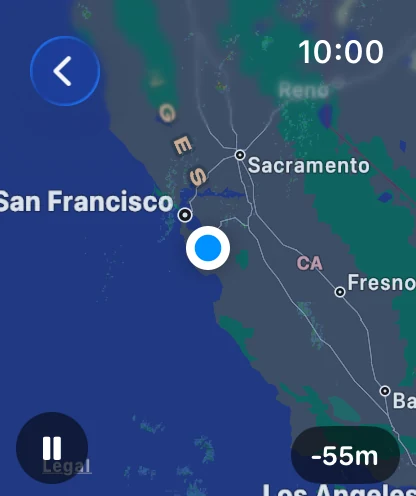
Radar on the Watch plays animated precipitation imagery right on your wrist — roughly the last hour of real observations plus the next two hours of forecast — centered on your location, with your position marked on the map.
Radar is a Gold feature. See Plans & Subscriptions.
Opening the radar
In the watch app, tap the radar button in the top-right corner of the main screen. It's available whenever weather has loaded.
Playing the animation
The animation starts automatically. Tap anywhere on the map — or tap the round play/pause button in the bottom-left corner — to pause or resume playback. You'll feel a small click each time.
Zooming with the Digital Crown
Turn the Digital Crown to zoom through six named levels. Each turn snaps to the next level and briefly flashes its name on screen so you always know where you are:
| Zoom level | View |
|---|---|
| Street | Closest — your immediate neighborhood |
| City | Your city |
| County | Your county and surroundings — the default |
| State | Your state |
| Region | A multi-state region |
| Country | Widest — most of the country |
Reading the time pill
The pill in the bottom-right corner tells you when the current frame is from:
- Now — the most recent radar observation.
- -25m (and similar) — a past observation, that many minutes ago.
- +15m, +30m, +45m, +60m — forecast frames, shown in yellow italics on the watch so you can't mistake a prediction for an observation.
The loop covers about an hour of history (frames roughly every 5 minutes) and up to two hours of forecast in 15-minute steps.
Note: Forecast frames are short-term predictions and get less certain the further out they go — treat the yellow frames as a best estimate, not a guarantee.
If something goes wrong
If the watch doesn't have a location yet, the radar shows a "No location" message — open the watch app's main screen and let it find you first. If the imagery fails to load, you'll see an error with a Try Again button.
Without Gold
If you're not a Gold subscriber, tapping the radar button shows an upgrade screen instead: "Radar is a Gold feature," with an explanation of what you get and an Open on Phone button that opens Forecast Bar on your iPhone so you can upgrade there. Your current tier is shown at the bottom of that screen.
